
Reloco
Your co-pilot for life on an F-1 visa.
A web app that gives international students at UNC one calm plan for everything the US asks of them, from visas and taxes to a phone number, a bank account and a driver's license, in the right order around their dates. An AI assistant answers questions about their own situation, and an encrypted vault keeps their documents ready and checked.
Solo project · Research, product, design, engineering · Live at reloco.app · 2026
01
At a glance
- Problem
- A new F-1 student has to handle immigration rules, taxes, an SSN, a US bank account and credit, housing, health insurance and IDs, each explained on a different site, on top of classes in a new country. The order lives in word of mouth, and one missed step can put a student's status at risk.
- Solution
- About 10 questions and Reloco knows which tasks apply, when each is due and what has to come first, then guides the student through them one at a time for the whole degree. It picks from 61 tasks across 9 areas, linked to 90 official and trusted pages. Tools inside the tasks check the student's own papers and compare options, Ask Reloco answers questions about their situation, Documents keeps their papers encrypted and checked, and Updates says how each new rule affects them.
- Scope
- F-1 undergrads at UNC only, so every office, deadline and link is exact. Schools are a data layer, so the next one is a content change, not a rebuild.
- Role
- Solo: user interviews, product strategy, UX and visual design, full-stack and AI engineering, security, launch.
- Status
- v2.6 live at reloco.app, October 2026, in invite-only early access: shared with UNC's international students, with the first testers using it.
02
Who it's for
An F-1 degree has three very different stretches. Reloco changes what it shows as a student moves through them.
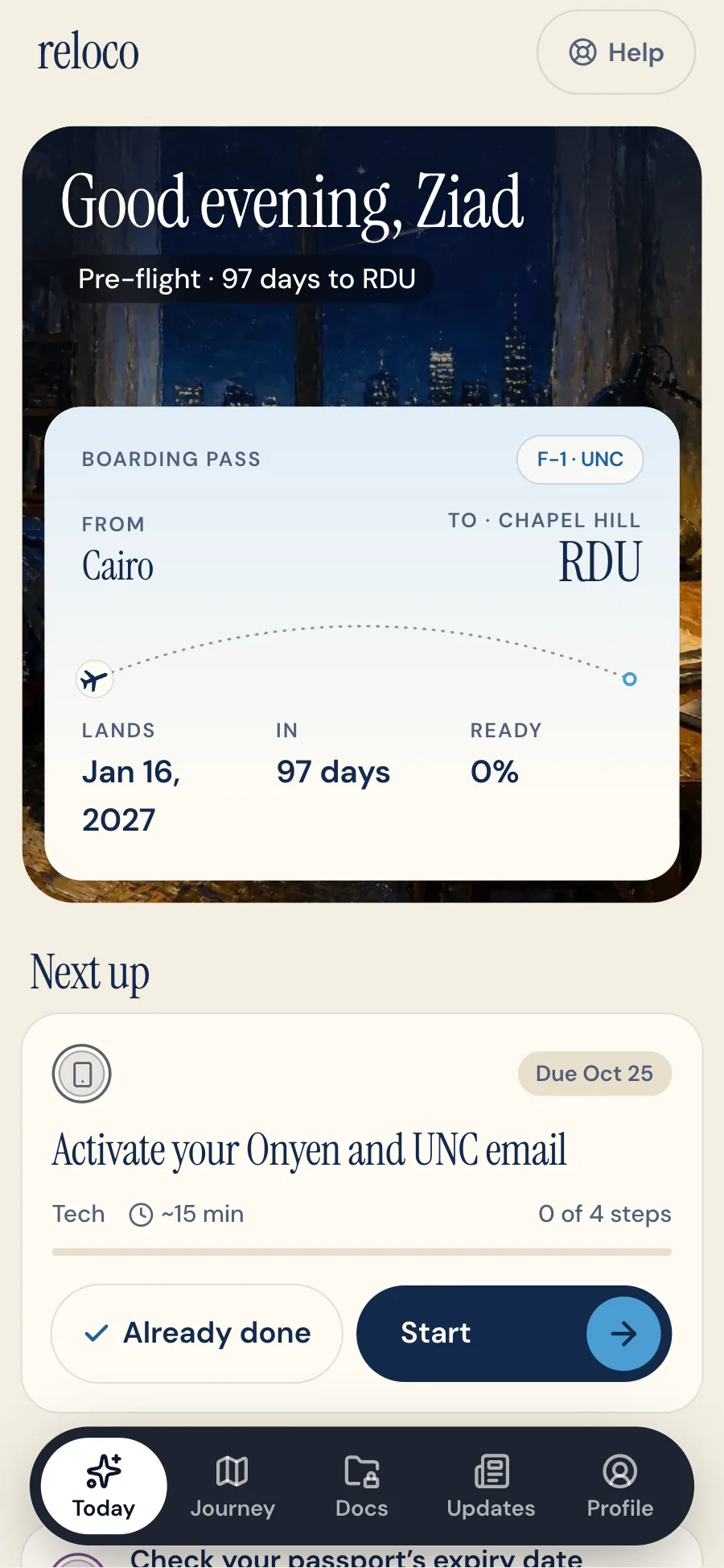
Arriving: new students
The heaviest stretch. For a sample new student, 15 of their 54 tasks are due before the flight or in the first week, from the I-901 fee and the entry window to the I-94 and ISSS check-in. Reloco counts down to landing, then switches to arrival mode.
Studying: sophomore to senior
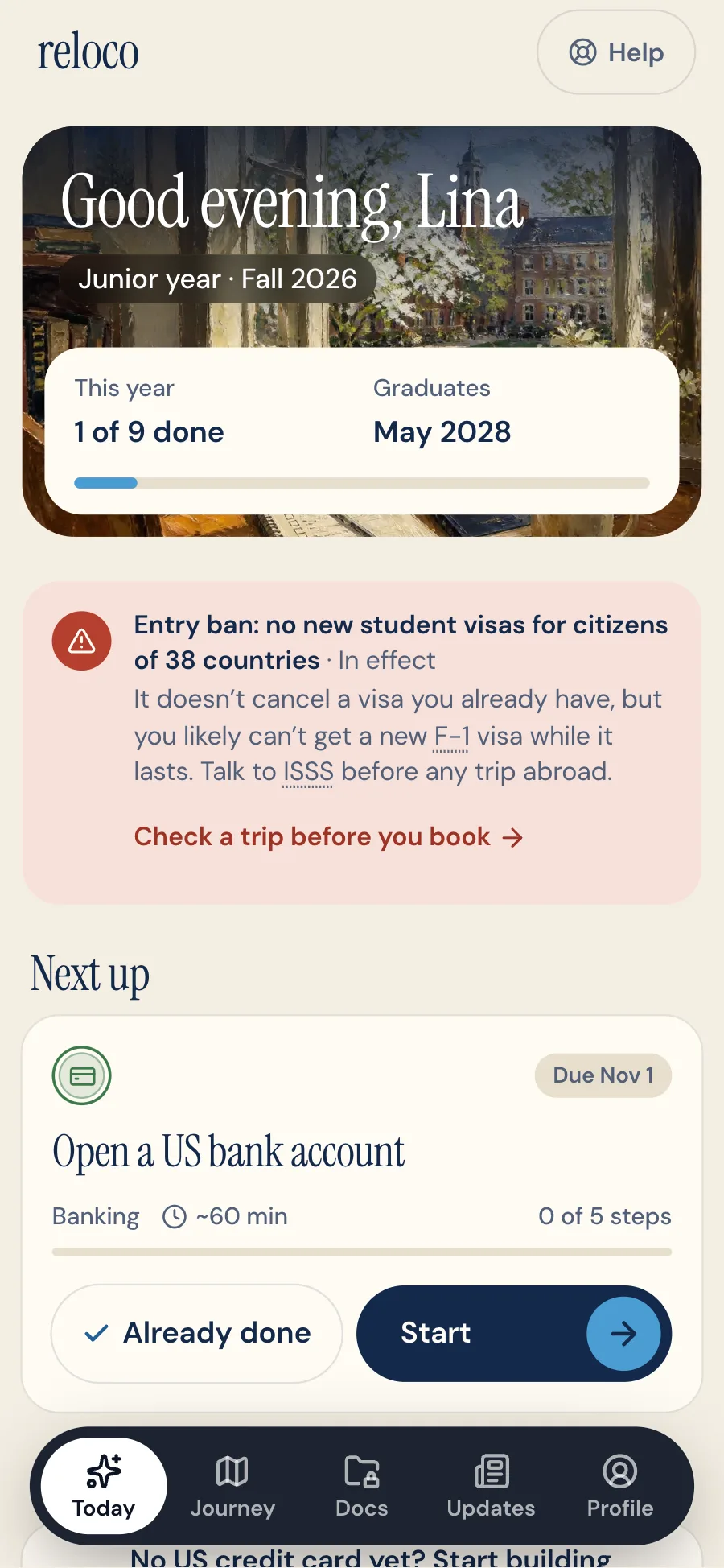
The work comes in yearly cycles: a travel signature before winter break, taxes every February, CPT before a summer internship, full-time enrollment each fall. Reloco brings each one back on schedule, every year. Current students who join mid-degree start with everything behind them already checked off, and when life changes (a job, a trip abroad, a move) the paperwork joins the plan.
Graduating: OPT and STEM OPT
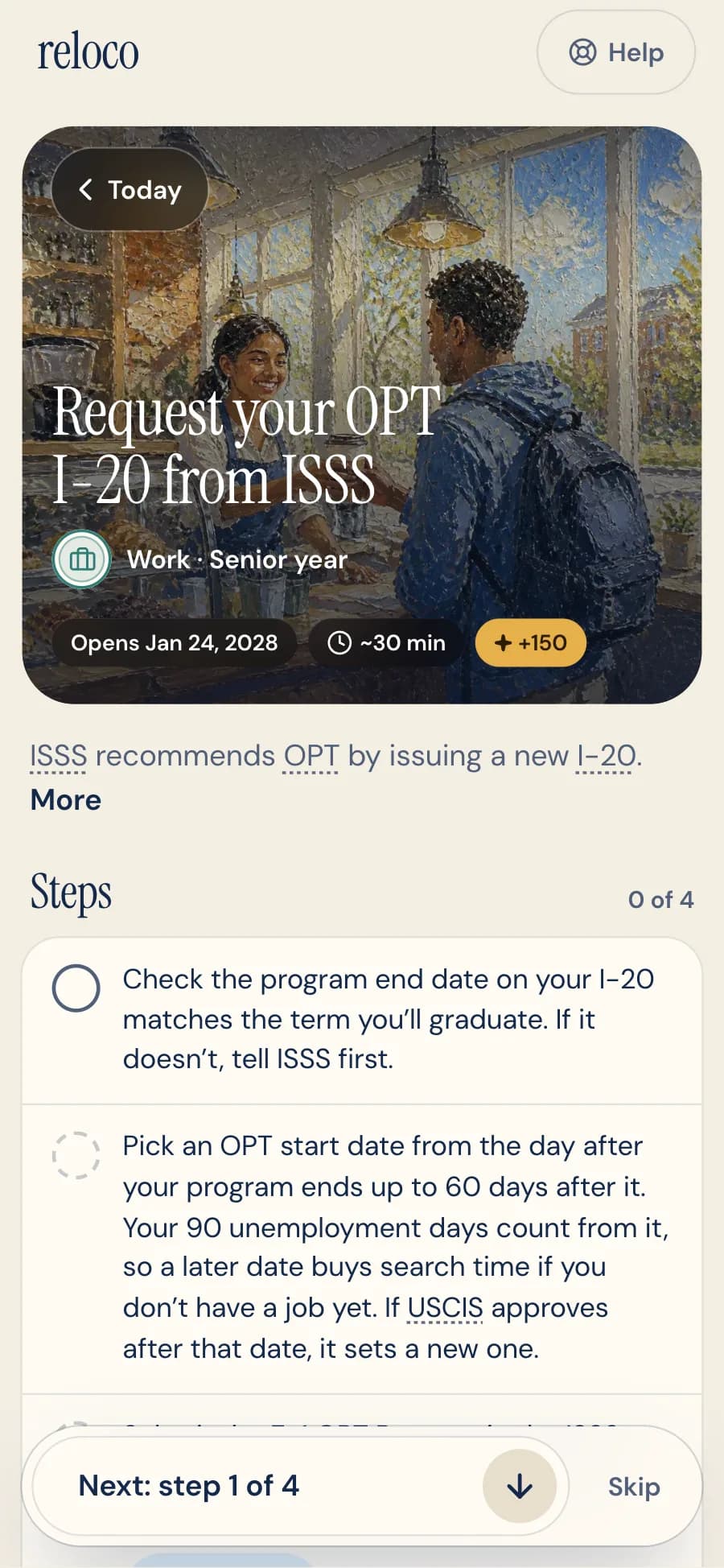
The highest-stakes filing of the degree has a strict window. Reloco times it from the graduation date: decide, request the OPT I-20, file the I-765 inside the window, then report the job while Reloco counts unemployment days against the limit. STEM majors get the 24-month extension on the same track.
03
Research (v0)
Reloco started with interviews with international students at UNC. Four findings shaped v1.
Order is the hard part
“I first had to find a job on campus.”Junior from Vietnam, on getting an SSN
Ships todayTasks know their dependencies. A task that needs another first is locked, with a "Finish this first" link to it.
The information is scattered
“It's all out there, but it's, like, all fragmented.”Junior from London
Ships todayEvery rule links to its source: a UNC office, a federal or state agency, or a consumer-protection guide.
Know-how travels by word of mouth
“The people before me passed the knowledge to me.”Junior from Vietnam
Ships todayReloco gives every student the plan an upperclassman would, starting before the flight.
Deadlines hide years ahead
“You should be meeting with them like eight to twelve months in advance.”Junior from London, on CPT approval
Ships todayThe plan runs by class year through After graduation, and CPT comes back every spring.
| Insight | Evidence | What ships today |
|---|---|---|
| Order is the hard part | “I first had to find a job on campus.”Junior from Vietnam, on getting an SSN | Tasks know their dependencies. A task that needs another first is locked, with a "Finish this first" link to it. |
| The information is scattered | “It's all out there, but it's, like, all fragmented.”Junior from London | Every rule links to its source: a UNC office, a federal or state agency, or a consumer-protection guide. |
| Know-how travels by word of mouth | “The people before me passed the knowledge to me.”Junior from Vietnam | Reloco gives every student the plan an upperclassman would, starting before the flight. |
| Deadlines hide years ahead | “You should be meeting with them like eight to twelve months in advance.”Junior from London, on CPT approval | The plan runs by class year through After graduation, and CPT comes back every spring. |
Personas
Connected Khoa
The community learner
Junior at UNC, from Vietnam.
“The people before me passed the knowledge to me.”
Learns US systems from upperclassmen and WhatsApp groups, and goes in person instead of searching online.
Goals
- Handle each system as it comes up, without stress
- Build credit gradually
- Help younger international students settle in
Frustrations
- Doesn't know what he doesn't know until it's urgent
- Depends on who happens to be around
- Stuck when nobody he knows has done it before
Traits
- ReactiveProactiveLeans reactive
- Peer-dependentSelf-reliantLeans peer-dependent
- InformalOfficial sourcesLeans informal
- GuidedTrial and errorLeans guided
- Low frustrationHigh frustrationLeans low frustration
What Reloco gives them
The guidance his network gave him, without depending on luck.
Independent Amara
The self-driven researcher
Junior at UNC, from London.
“It's all out there, but it's, like, all fragmented.”
Builds her own plan from DHS and ISSS pages, and checks every chatbot answer against the source.
Goals
- Master every system before it catches her off guard
- Land an employer willing to sponsor her visa
- Create the guide she wished she had
Frustrations
- Information is spread across dozens of sources
- Advisors are slow and miss the details of her case
- Chatbots give partly wrong answers she has to verify
Traits
- ReactiveProactiveLeans proactive
- Peer-dependentSelf-reliantLeans self-reliant
- InformalOfficial sourcesLeans official sources
- GuidedTrial and errorLeans trial and error
- Low frustrationHigh frustrationLeans high frustration
What Reloco gives them
Sources she can check, without the hours of research, and an assistant that cites them.
v0 concept: Amara's first week
The v0 concept organized tasks by phase, used a Build credit task and blocked tasks behind a lock screen. None of these ship today.
01
Discovery
Finds Reloco through a peer tip in a WhatsApp group
02
Onboarding
Answers a few questions
03
Plan
Sees tasks by phase and taps Build credit
04
Blocked task
Hits a lock: complete your SSN first
05
SSN first
Follows the guide to the SSA office
06
Credit card
Returns to the unlocked task and applies
How Amara felt at each stage
- Discovery: Overwhelmed
- Onboarding: Relieved
- Plan: Excited
- Blocked task: Briefly frustrated
- SSN first: Confident
- Credit card: Accomplished
Discovery: Overwhelmed, Onboarding: Relieved, Plan: Excited, Blocked task: Briefly frustrated, SSN first: Confident, Credit card: Accomplished.
Blocked task. The moment that shaped dependencies: a clear 'do this first' instead of a dead end.
Task flow
- Land on Reloco
- Onboarding
- Plan generated
- Open a task
Has an unfinished prerequisite?
04
From concept to v1
Building it and walking it as real students changed most of the v0 concept. Five shifts:
v0
v1
Why
v0Tasks grouped by phase
v19 chapters: five for year one, then class years through OPT
WhyStudents think in semesters and years, and the costly deadlines (CPT, OPT) come later
v0A lock screen on blocked tasks
v1A "Finish this first" card linking to the task before it; tasks stay open to read
WhyA lock stops a student cold. A pointer tells them what to do next
v0A few onboarding questions
v1The stage comes first: still at home, just arrived, or already studying
WhyA freshman and a junior need different plans from the first screen
v0One first-week journey
v1Every year, repeating tasks, and arrival mode for the landing window
WhyFreshmen need the most help, but upperclassmen still miss yearly deadlines
v0Overdue in red for everything past due
v1"From before you joined · done?" for anything due before sign-up
WhyA late joiner shouldn't start the app already failing
05
The product
One job: take the stress out of the US system, so a student always knows what's next and never misses a step.
5.1
Onboarding that reads your situation
- What it does
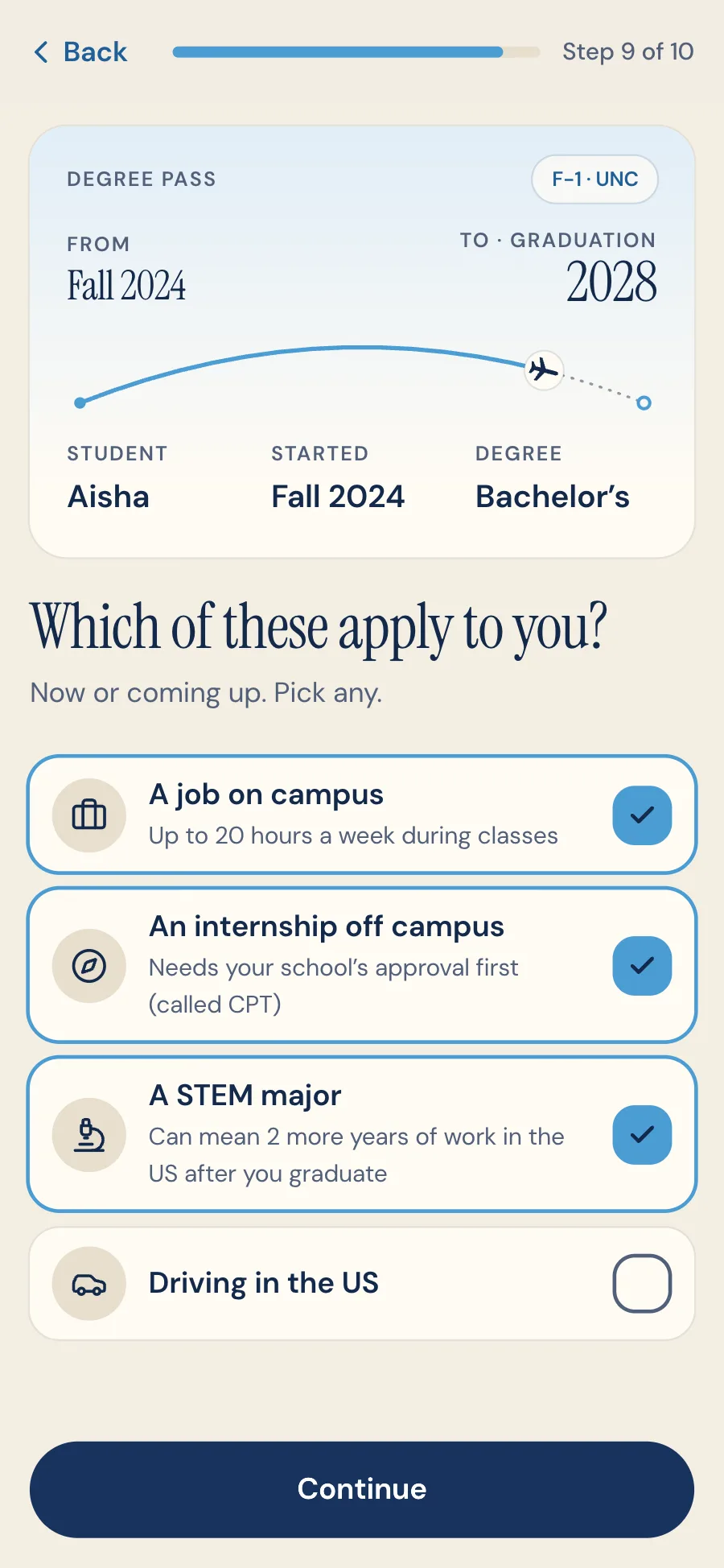
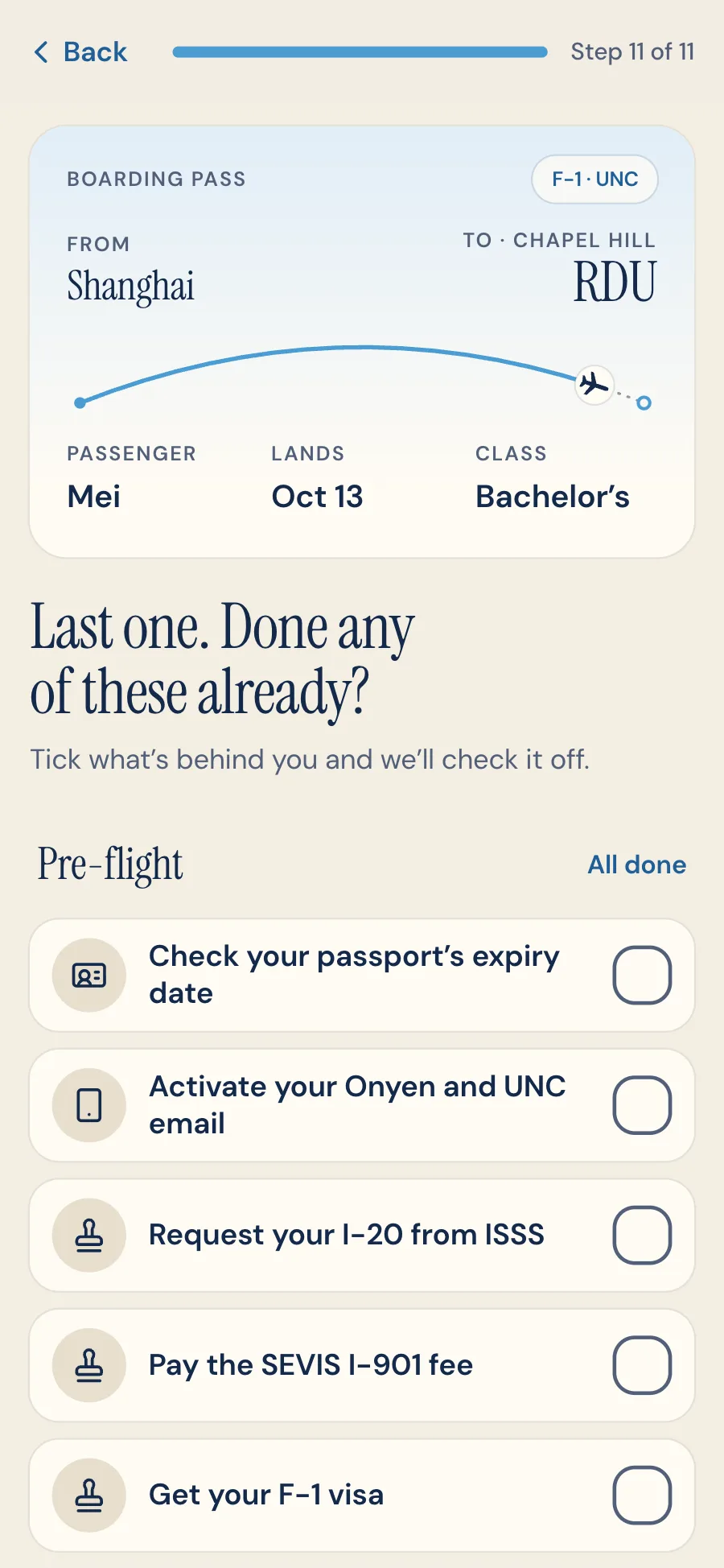
- About 10 questions: the stage (still at home, just arrived, already studying), country, arrival, start and graduation dates, housing, funding, SSN and bank, and plans (campus job, internship, STEM major, driving). A boarding pass fills in as you answer. With an account, students can upload their I-20, passport and I-94 during signup, and the dates fill themselves in, marked to check.
- Why it matters
- A freshman two days from landing and a junior planning CPT need completely different plans. New students can tick off prep they've already done; current students start with year one behind them. The copy follows the stage too, so a junior never reads 'get ready to fly'.
- How I built it
- Date ranges are validated per stage, and answers are validated on the server with Zod.
5.2
A rules engine that knows what applies to you
- What it does
- Nine areas: immigration, taxes, work, banking, IDs, housing, health, campus and tech. A personal, dated plan. Tasks appear only when they apply: the campus job only if you'll work, STEM OPT only for STEM majors, a driver's license only if you'll drive. Change a date in Profile and the whole plan reschedules, keeping progress.
- Why it matters
- A generic checklist buries what matters to you.
- How I built it
- A pure, deterministic pipeline, detailed in Engineering. Modeling dependencies caught a real cycle: the campus job needed an SSN, but the SSN needs a job offer. An optional AI step (Claude) writes short notes on the tasks where the student's situation changes something. It can't add, move or remove anything, so every date stays deterministic and sourced.
5.3
Today: one next step
- What it does
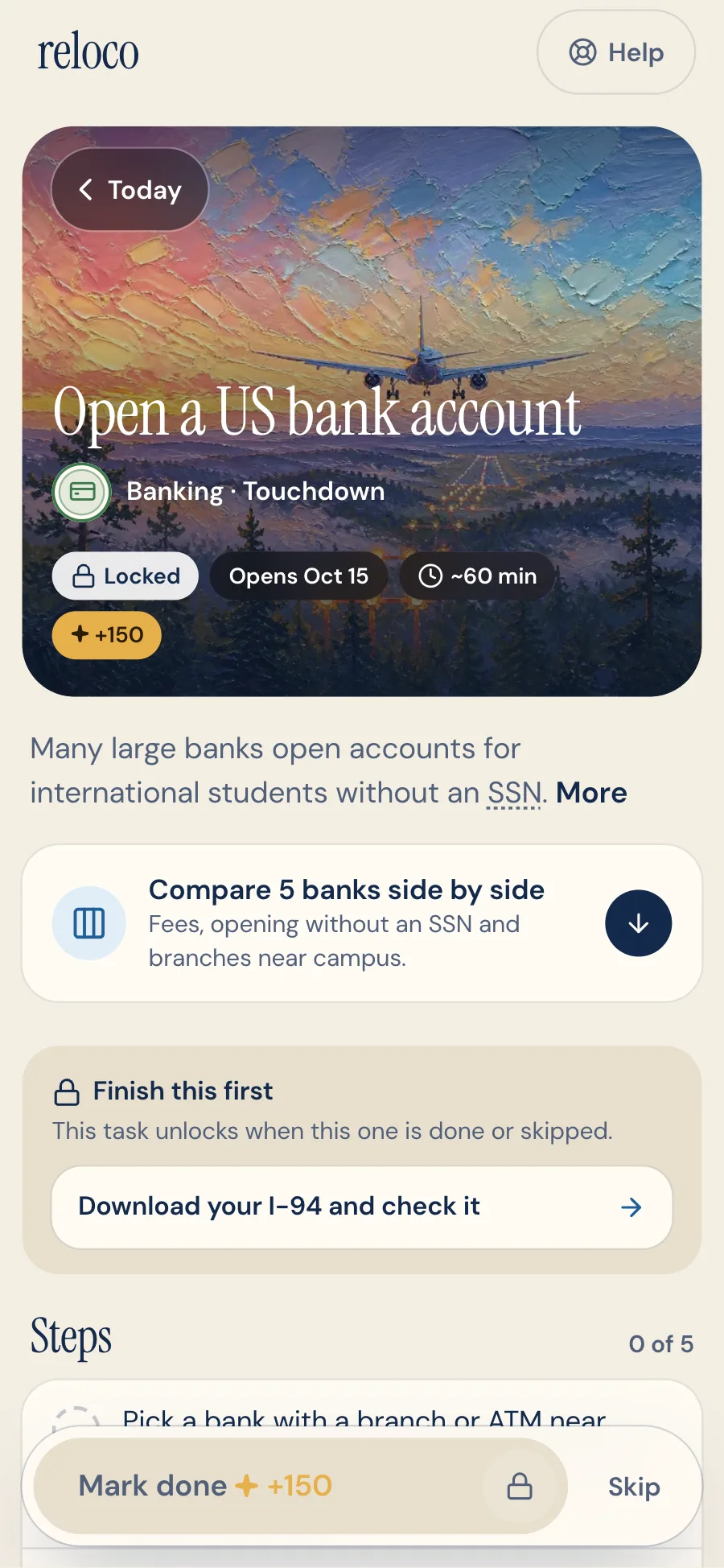
- One focus task and at most two more this week. A task waiting on another is locked: a "Finish this first" card links to what comes first, and its steps and Mark done button stay locked until then.
- Why it matters
- Hick's Law. One clear action beats a list of 40. Calm urgency: red means a real missed deadline, or a rule that changes what's safe to do. Anything due before a student joined asks 'done?' instead, so a late joiner doesn't start the app already failing.
- How I built it
- A planner ranks by urgency and dependencies. The order is enforced on the server too: completing a task checks its prerequisites, and steps can only be ticked in order. Skipping cascades to the tasks that depend on it, and reopening restores them.
5.4
Inside a task
- What it does
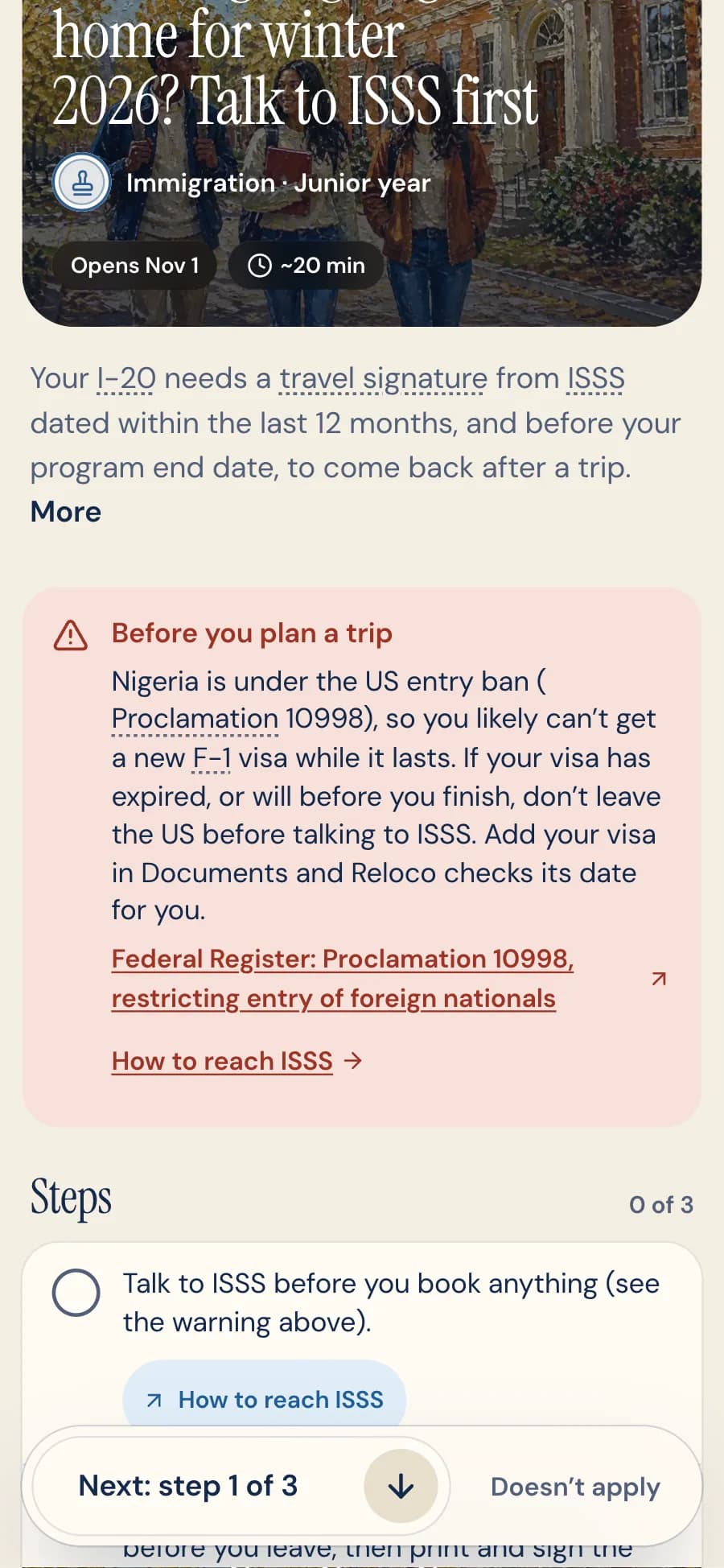
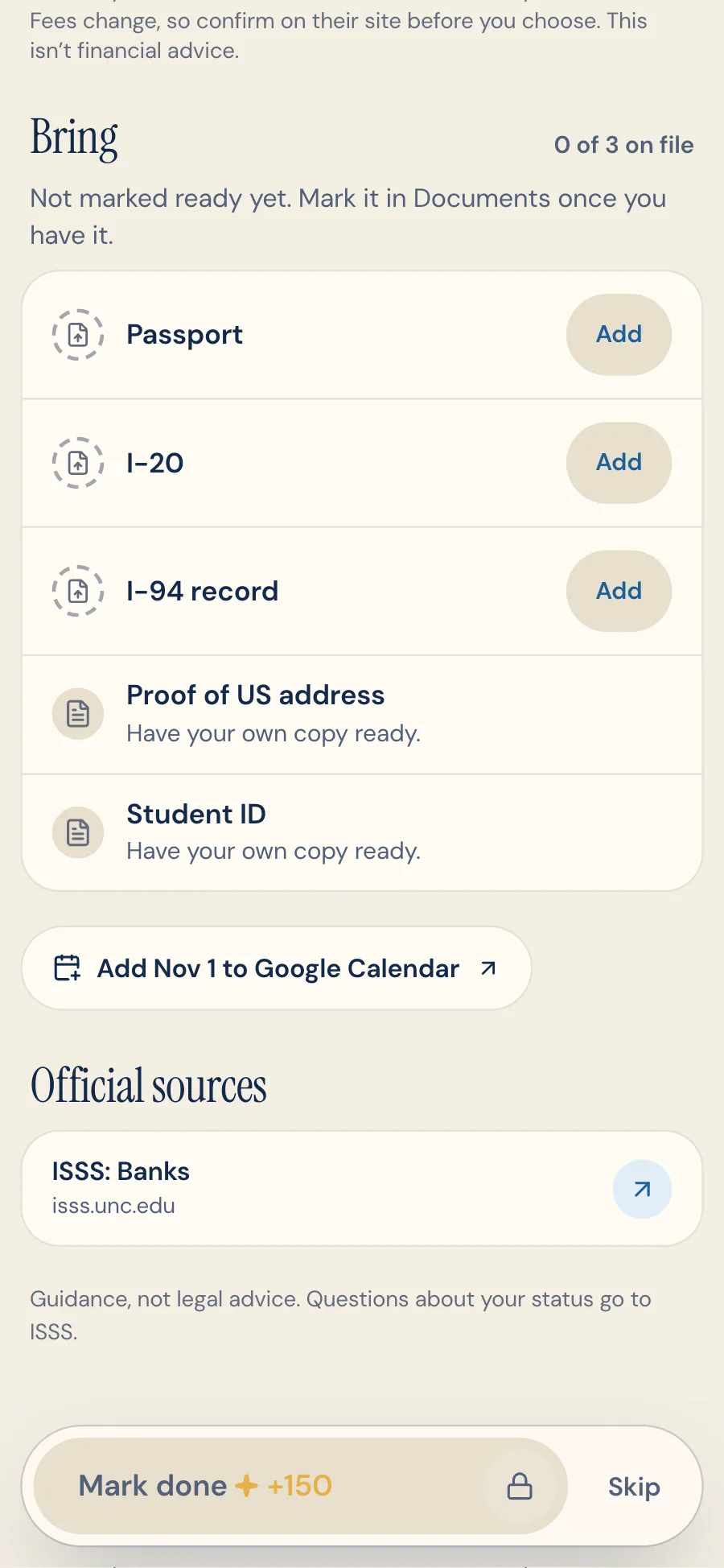
- A few short steps with tick boxes, and the source link on the step that needs it. Then what to bring, checked against the student's Documents (on file, needs a check, or missing with an Add button), add to calendar, the sources, and a fixed bar that points to the next step (Next: step 1 of 3), then becomes Mark done, beside Skip (or Doesn't apply for a trip or a move).
- Why it matters
- "Pack your entry documents" is really four small actions. Broken down, it's 20 minutes, not a worry.
- How I built it
- Steps, sources, documents, time and miles are typed fields in the task library, so every task renders the same way.

5.5
Tools that do the hard part
- What it does
- Get your F-1 visa: the passport, I-20, SEVIS fee receipt and DS-160 confirmation page are checked against each other, the interview date against the SEVIS fee and the earliest day the embassy can issue the visa, and after the interview a 221(g) or 214(b) result says what it means, what to do and how it affects the start date, with the email to ISSS drafted.
- Download your I-94: Reloco compares it with the passport, point by point, and drafts the email to ISSS if something differs.
- Apply for an SSN: an SSA visit plan, from what has to be ready (the job offer, the ISSS check-in, the documents) to the Durham office and its number.
- Before a trip home: the travel signature, passport and visa are checked against the dates of the trip.
- Getting a driver's license: a DMV visit plan, from the documents in Documents (no SSN needed) and proof of address to insurance, the nearest office and the tests.
- Also: a lease explained in plain words, the major checked against the DHS STEM list, CPT months counted from an offer letter, immunizations checked against UNC's rules, an OPT unemployment counter, help deciding whether to enroll in or waive student health insurance, and a dated task when a student reports a move.
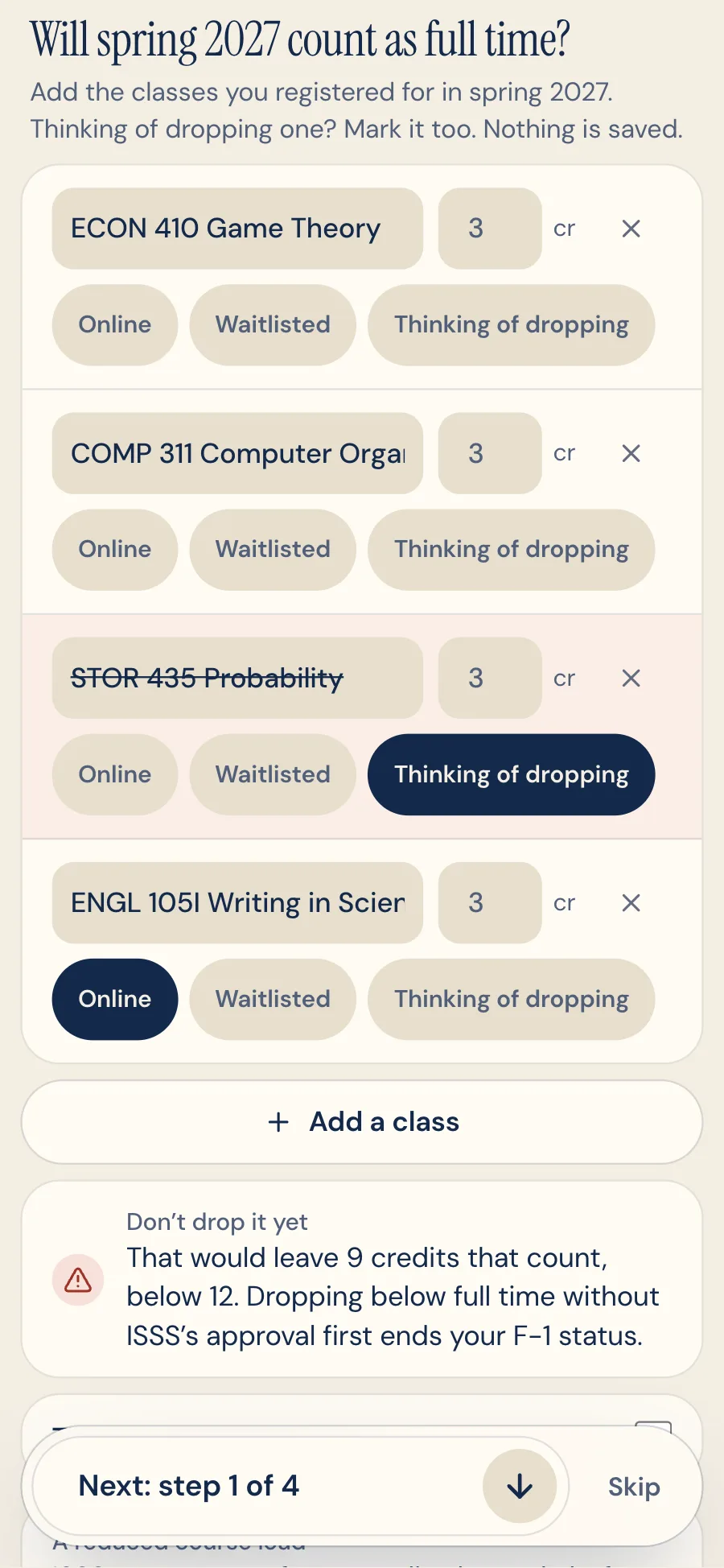
- Can I drop a class? The student's classes (typed, or read from a screenshot of their schedule) checked against full time: 12 credits, only one online class counts, waitlisted ones don't. Before a drop takes them below, it says to get ISSS's approval first, with the reasons that qualify and the drop deadline.
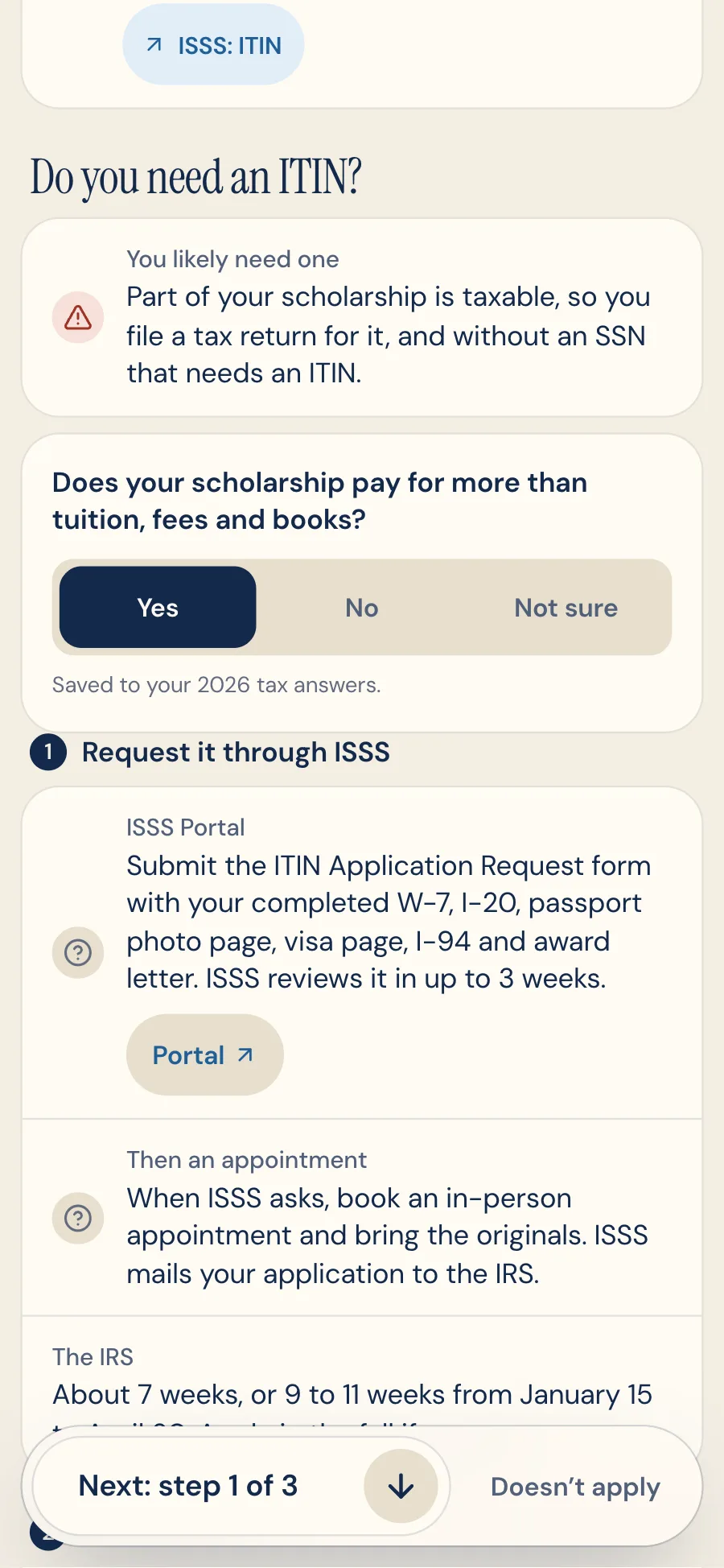
- Do you need an ITIN? Usually not. An award letter is read to split what's tax free (tuition, fees, books) from what's taxable (housing, meals, a stipend), and only a taxable part leads to the W-7 packet and ISSS's process.
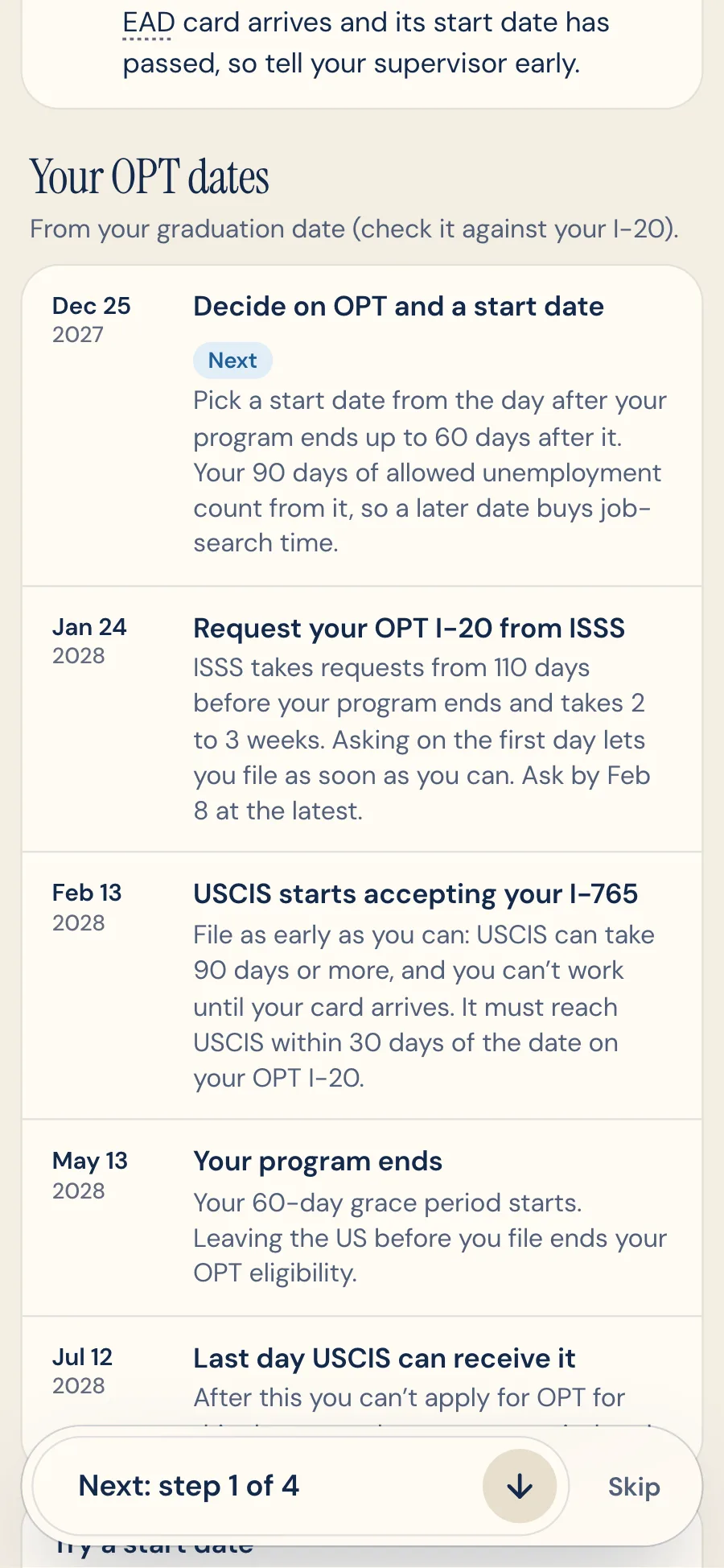
- Also new: an I-20 extension task when the I-20 ends before graduation, a W-4 checked from a photo before payroll gets it (the SSN is never read), whether an internship can be CPT under the August 2026 federal guidance, and OPT dated from graduation.
- Why it matters
- Steps say what to do. The hard part is knowing whether your own papers are right: a wrong date of birth on an I-94 or a visa that lapses over winter break can stop a student at the border. Each tool runs that check with the student's own documents and dates.
- How I built it
- The checks are plain code, not AI: date math (down to the 3 business days ICE says a SEVIS fee payment needs to be verified before the interview, skipping federal holidays), the STEM list, CPT months, the J-1 insurance minimums. AI only reads documents, and readers that explain an upload (a lease, an insurance policy, an offer) quote the exact words they relied on. A file picked just for that is read once and never stored. Each reader has its own eval: the insurance reader passed 49 of 49 checks on invented policies, and the award-letter, class-schedule and W-4 readers passed 69 of 69, twice, quoting every value word for word and never returning an SSN.
5.6
Compare before you choose
- What it does
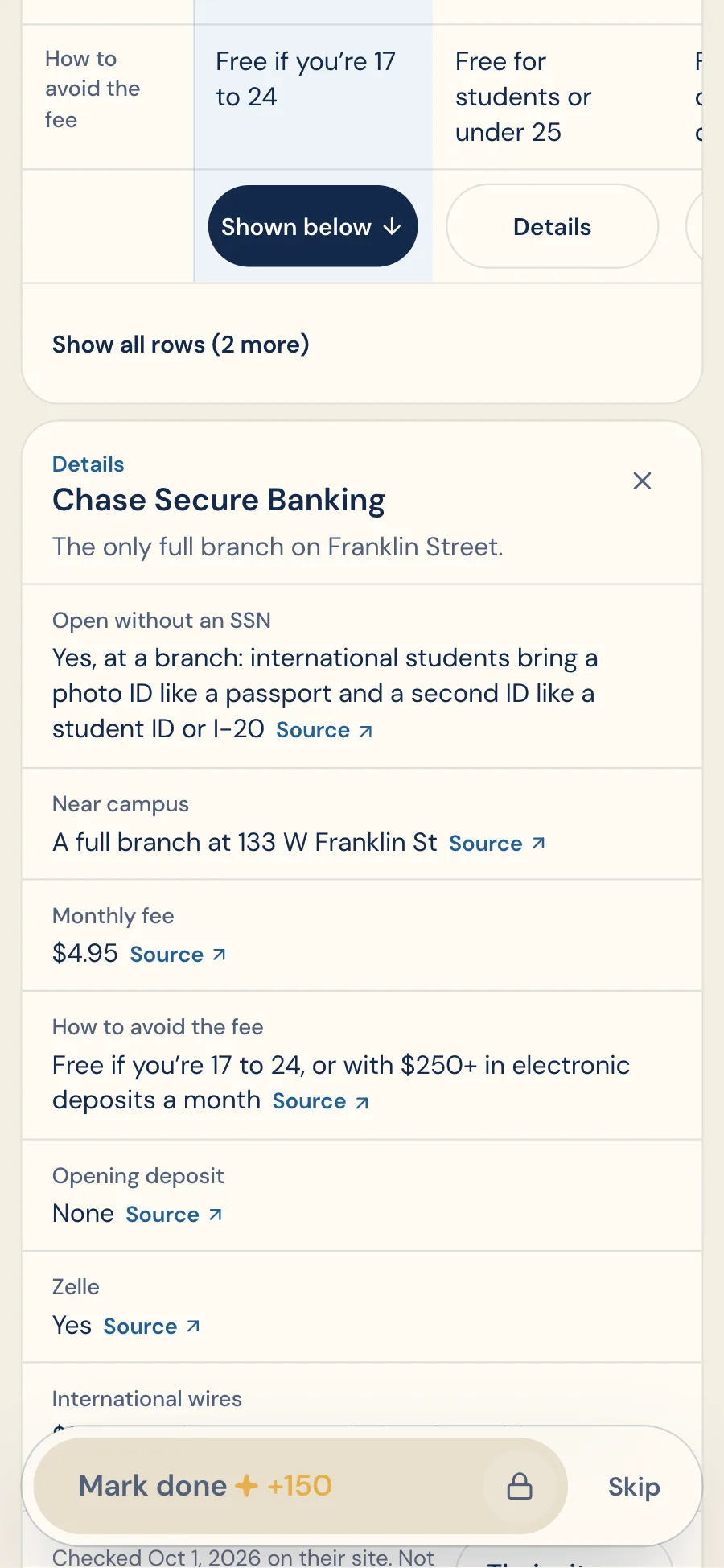
- A bank, a first credit card, a phone plan and a way to get money from home, compared side by side on the task where the student needs them.
- Rows are ordered for the student: without an SSN, opening without one and being near campus come first. Short answers show at a glance, and Details opens the full terms, each linked to the provider's own page.
- Money transfers are filtered by home country. Most services can't send from China, Egypt, Ghana, Vietnam or Nigeria, so those students see a bank wire and a note saying why.
- Found another option? Paste its terms or add a screenshot, and it joins the table with the exact words each value came from.
- Why it matters
- Comparison sites are often paid per sign-up, and few say what works without an SSN. Here every fact links to the provider's own page with the date I checked it, options whose key facts I couldn't confirm are left out, and nobody pays to be listed.
- How I built it
- The first version stacked one card per bank, which made comparing hard. Walking it, I rebuilt it as a real table: rows that matter first, rows that are the same for every option folded into one line, and details only when asked for. Tests fail on any fact without a source or any link to a review or affiliate site. Reading an added option uses structured outputs, and on invented fee sheets it passed 31 of 31 checks with nothing invented.
5.7
Ask Reloco: an assistant that knows your plan
- What it does
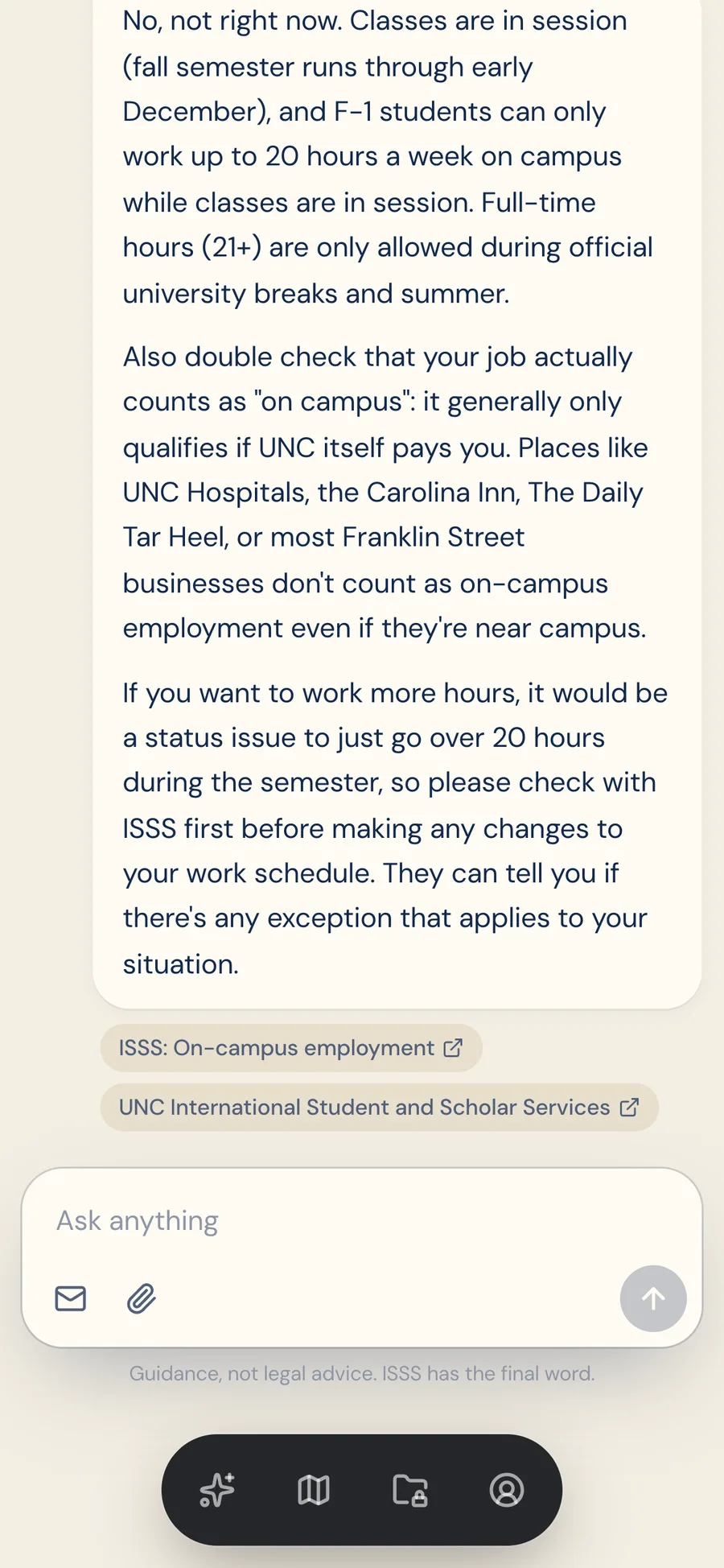
- Ask anything, paste an email or attach a letter. Answers come from the student's own plan, dates and documents, and cite the task, checked fact or official page they rely on.
- Work, travel and OPT questions run a check against where the student is: their stage, dates, finished tasks and CPT so far. Anything that affects their status is marked "Confirm with ISSS".
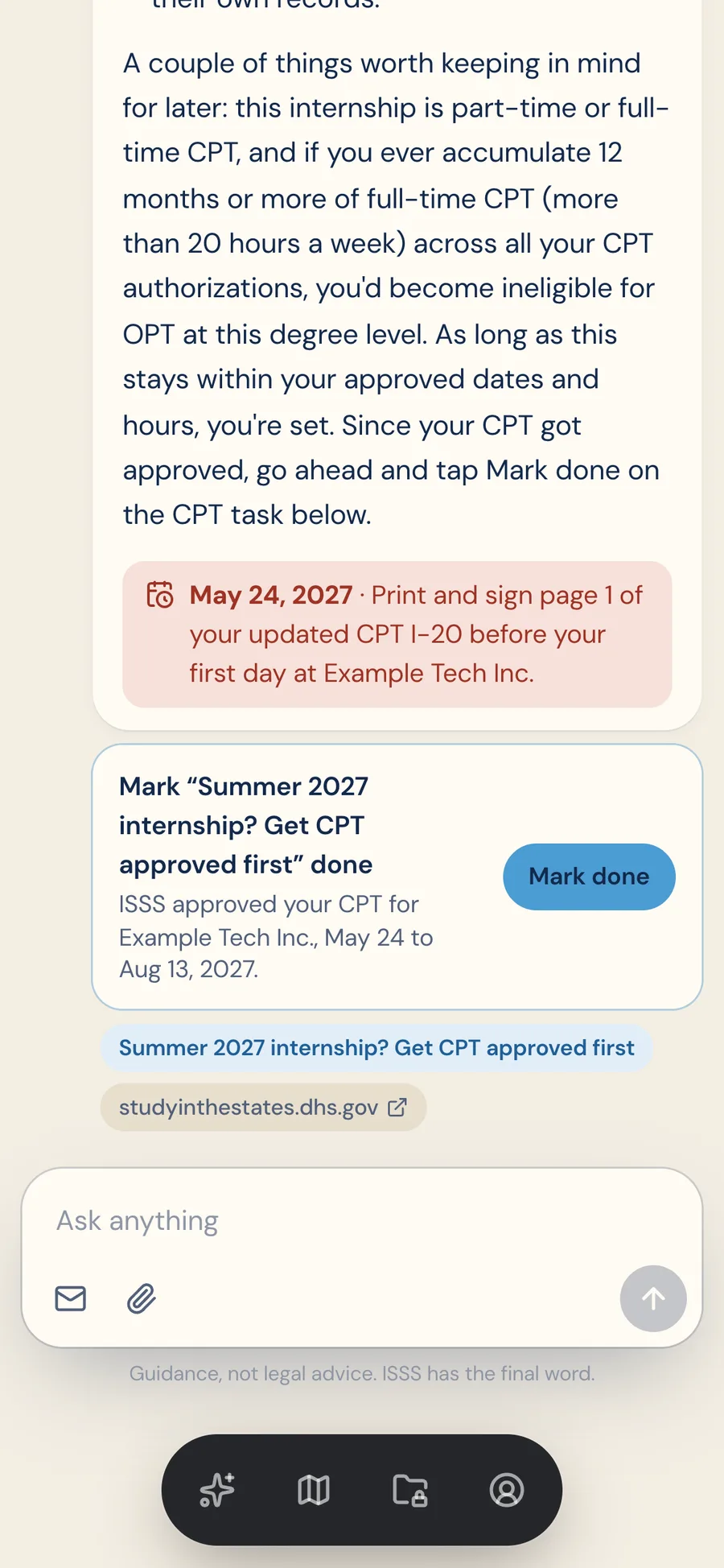
- When a message changes the plan, like a CPT approval, it offers a one-tap update. Nothing changes until the student taps.
- Why it matters
- Students told me chatbots sounded sure and were partly wrong. Here, code checks every answer before the student sees it, and the assistant can't change the plan on its own.
- How I built it
- Claude Sonnet 5 in a streaming tool-use loop I wrote, with 10 tools of my own (the plan, a task, their documents, work, travel, OPT, STEM, unemployment and tax checks, and one for deadlines and suggestions) plus web search limited to 17 official domains. Citations are validated on the server: only a task in their plan, one of 75 checked facts, or a page the search actually returned counts. New rules from Updates are in its context too, so it can say whether one affects the student. The screens show a real answer for a sample junior.
5.8
Documents: an encrypted vault that checks what you upload
- What it does
- 13 kinds of documents, from the passport, visa, I-20 and DS-160 confirmation page to a lease and a job offer.
- AI reads the key details for the student to confirm (they can switch it off on any upload), and the plan uses the real dates. It checks the upload is the right document first: a lease uploaded as a passport is refused before it's stored.
- Tasks that need documents show what's on file, what needs a check and what's missing.
- Why it matters
- A passport and an I-20 are the most sensitive things a student owns, so trust had to be designed in from the first version, not added later.
- How I built it
- Names and numbers are encrypted in the app with AES-256-GCM before they reach the database, with separate keys for sensitive and high-risk fields, and each value is bound to its student and field. Files live in a private bucket, served only through Reloco and typed by their real bytes, never their name. Every upload, AI read, view and delete goes into a log students can read but not edit. On invented specimen documents, the reader got 196 of 196 fields right and passed 76 of 76 upload checks, accepting each document in its own slot and refusing it in the wrong one, and code checks official number formats so a misread number is flagged, not saved.



5.9
Arrival mode (new students)
- What it does
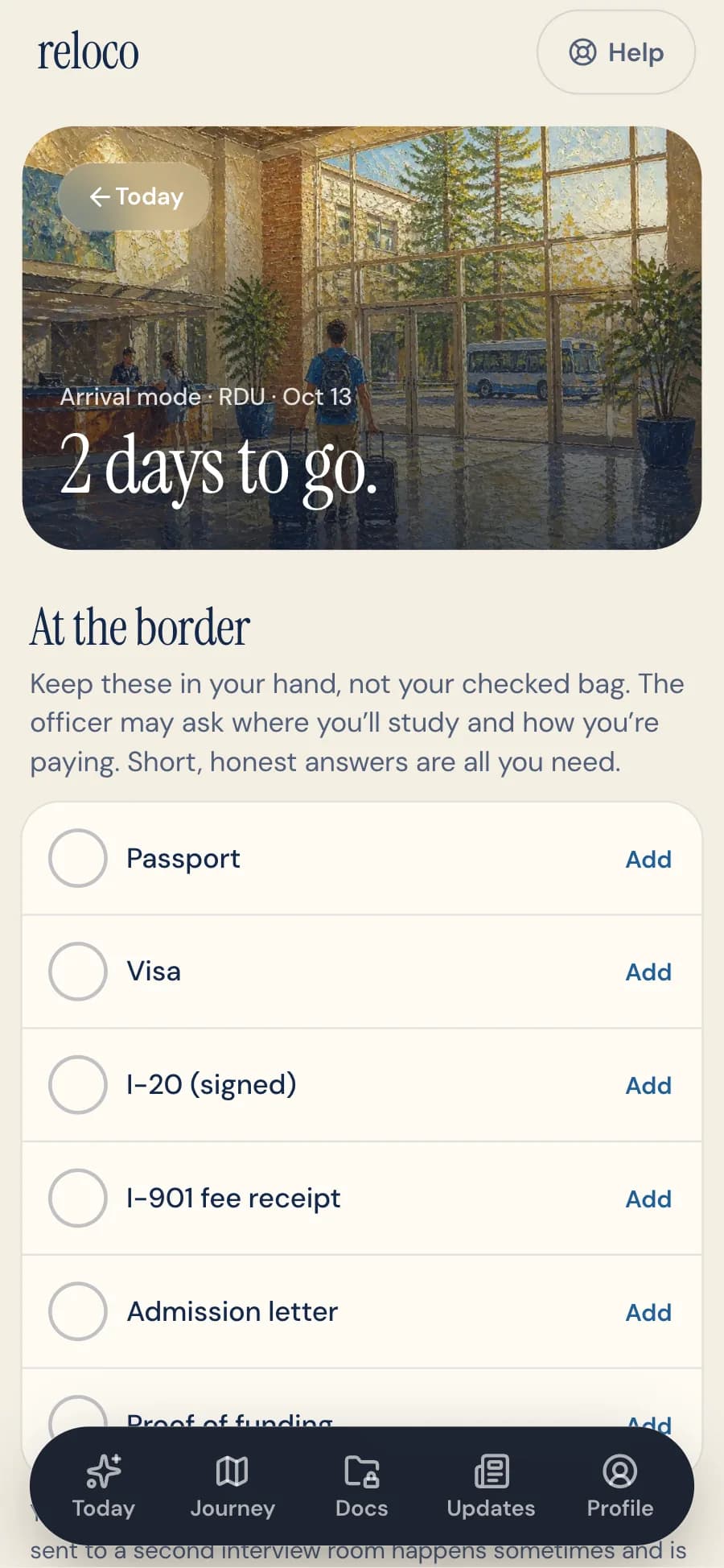
- Two days before landing, Today becomes a landing-day checklist: the border, the ride from RDU, the first 72 hours, and what to do if something goes wrong. On the day it asks "Did you make it?"
- Why it matters
- The border is the highest-stakes moment of year one, and flights move. "Yes" clears the travel tasks; "On a different day" fixes the date and reschedules everything.
5.10
Every year, on schedule (current students)
- What it does
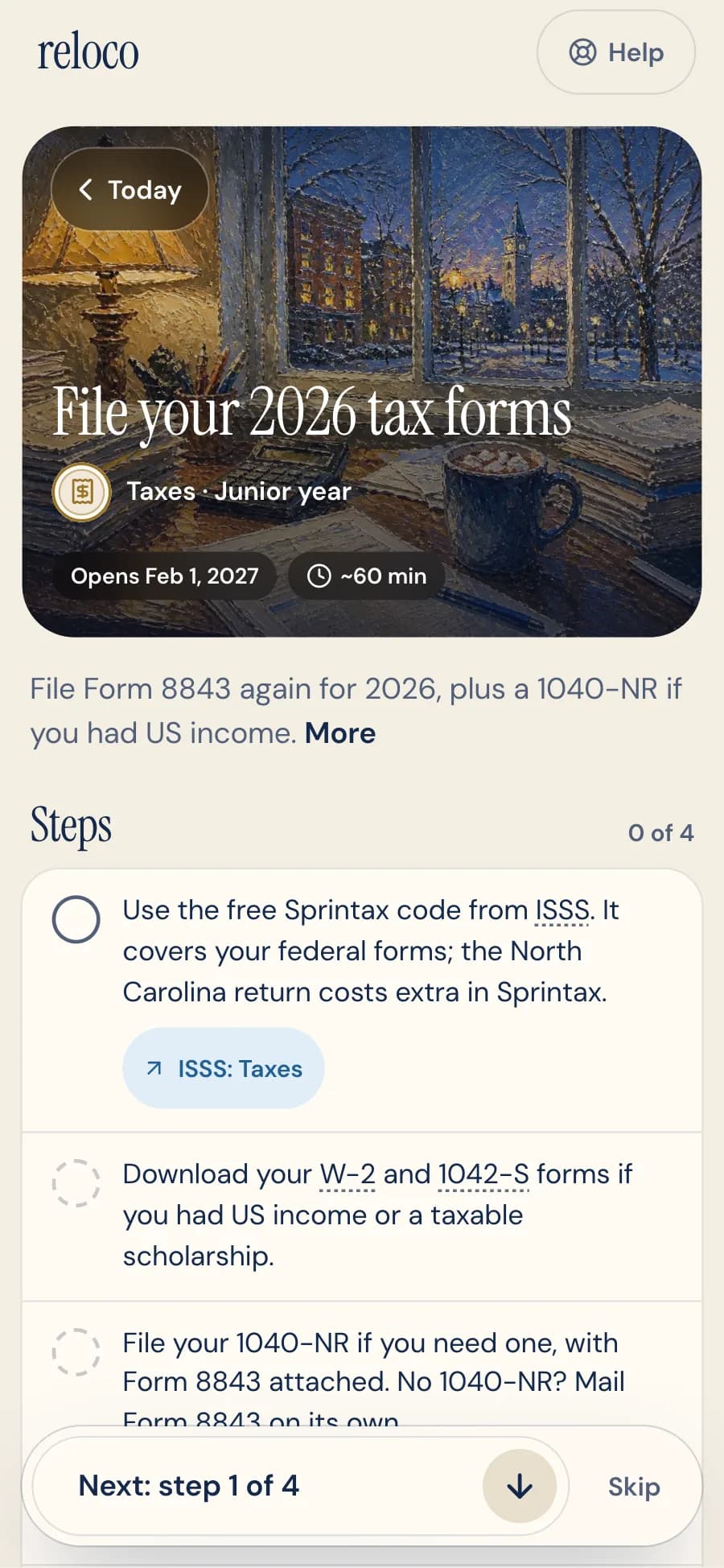
- Yearly tasks come back as dated copies: winter travel signature, tax forms (Form 8843, and a 1040-NR if there was US income), CPT for each summer, summer address and full-time enrollment. Optional ones, like a trip home or a summer move, close as "Not needed" if their date passes untouched, instead of sitting overdue. Tax tasks add treaty notes for the student's passport country. When a student reports a move, a dated task covers the 10-day address rule and everything else that needs the new address.
- Why it matters
- Upperclassmen don't need onboarding; they need the recurring deadlines they forget.
- How I built it
- A task can declare the years it repeats, or one copy per event; the engine creates a dated copy for each (like
tax-forms-2027, or one per reported move) and places it in the right chapter.




5.11
OPT and STEM OPT (graduating students)
- What it does
- Decide what's next, request the OPT I-20 from ISSS, file the I-765 inside the window, report the job and count unemployment days against the limit (90, or 150 on the STEM extension), then the STEM extension, with the major checked against the DHS STEM list. Before that, Reloco counts full-time CPT months, from the student or their I-20, and warns well before 12, the point where OPT is lost. When it's time to file, it works out the student's own window: USCIS must receive the application within 30 days of the OPT I-20 and no later than 60 days after graduation, so Reloco shows the real last day, the eligibility checks and what to send.
- Why it matters
- The OPT filing window is strict, and missing it can cost the job offer. Reloco surfaces it years early and in order.
- How I built it
- OPT tasks are anchored to the graduation date, with
requireschains so each step unlocks the next. The filing window is plain date math, tested at its edges. While I was building it, a DHS rule that would cut the 60 days to 30 was paused by a court, and the government's regulations site already showed the new text. The check follows what USCIS says it applies today, says so on the card, and switches with one setting if the rule takes effect.
5.12
When life changes
- What it does
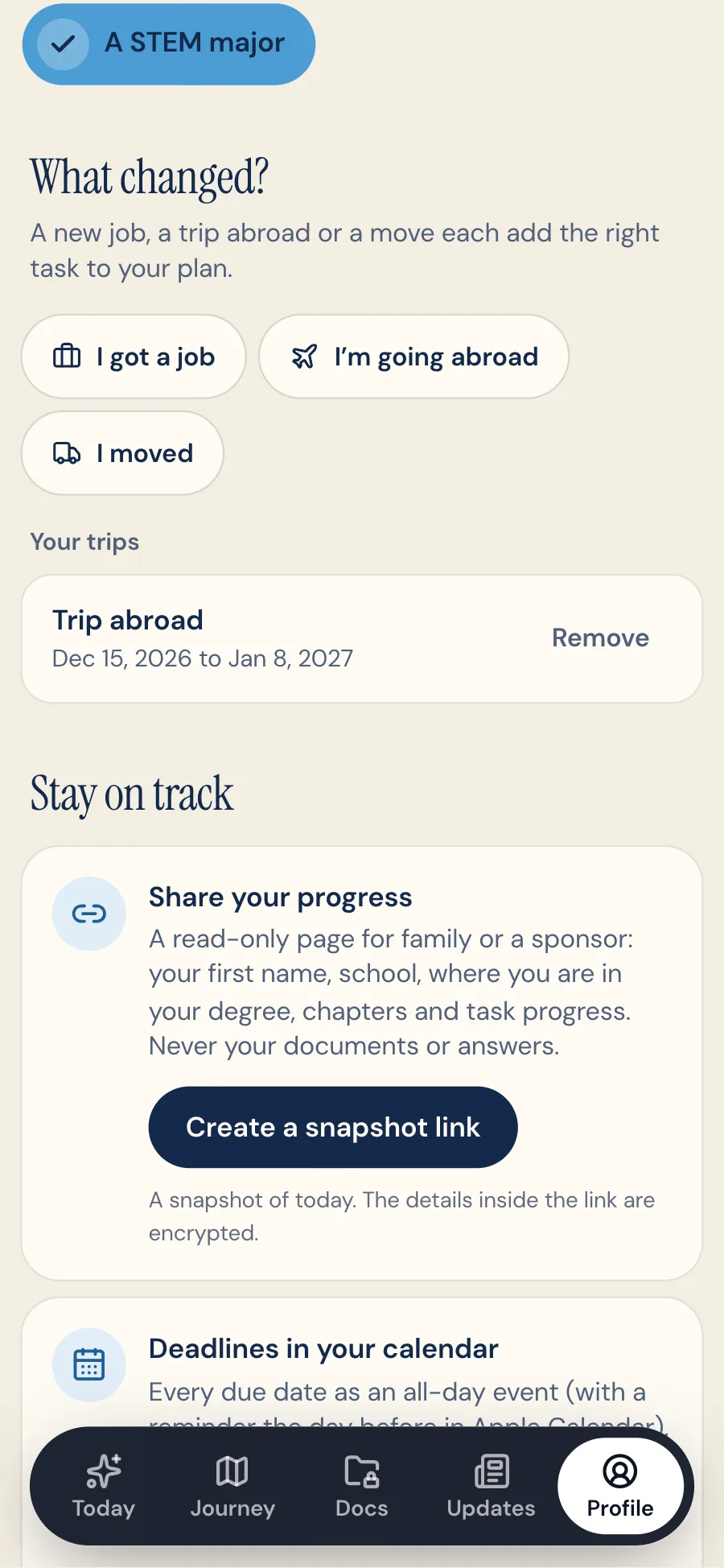
- I got a job, My SSN arrived, I'm going abroad, I moved: each adds the right task, dated to the event, not to the day the student landed. A campus job in year two gets its I-9, W-4 and SSN steps around its first day.
- A trip abroad gets its own checklist from 45 days out: the travel signature, the passport and visa against the return date, and the five-month rule for study abroad.
- At the start of each term, Today asks whether anything changed.
- Email reminders, if the student wants them: when a task opens, before it's due, and once if it slips, plus a new rule that affects them.
- Why it matters
- A plan made at signup goes stale. Students get jobs, SSNs and trips months later, and that's when the paperwork and its deadlines start.
- How I built it
- Events are pure functions on the student's facts, tested in every order and undone again. Reminders are opt-in, sent by a daily job through Resend, capped under the free plan's limit with the most urgent first, and never sent twice.
5.13
Taxes, the nonresident way
- What it does
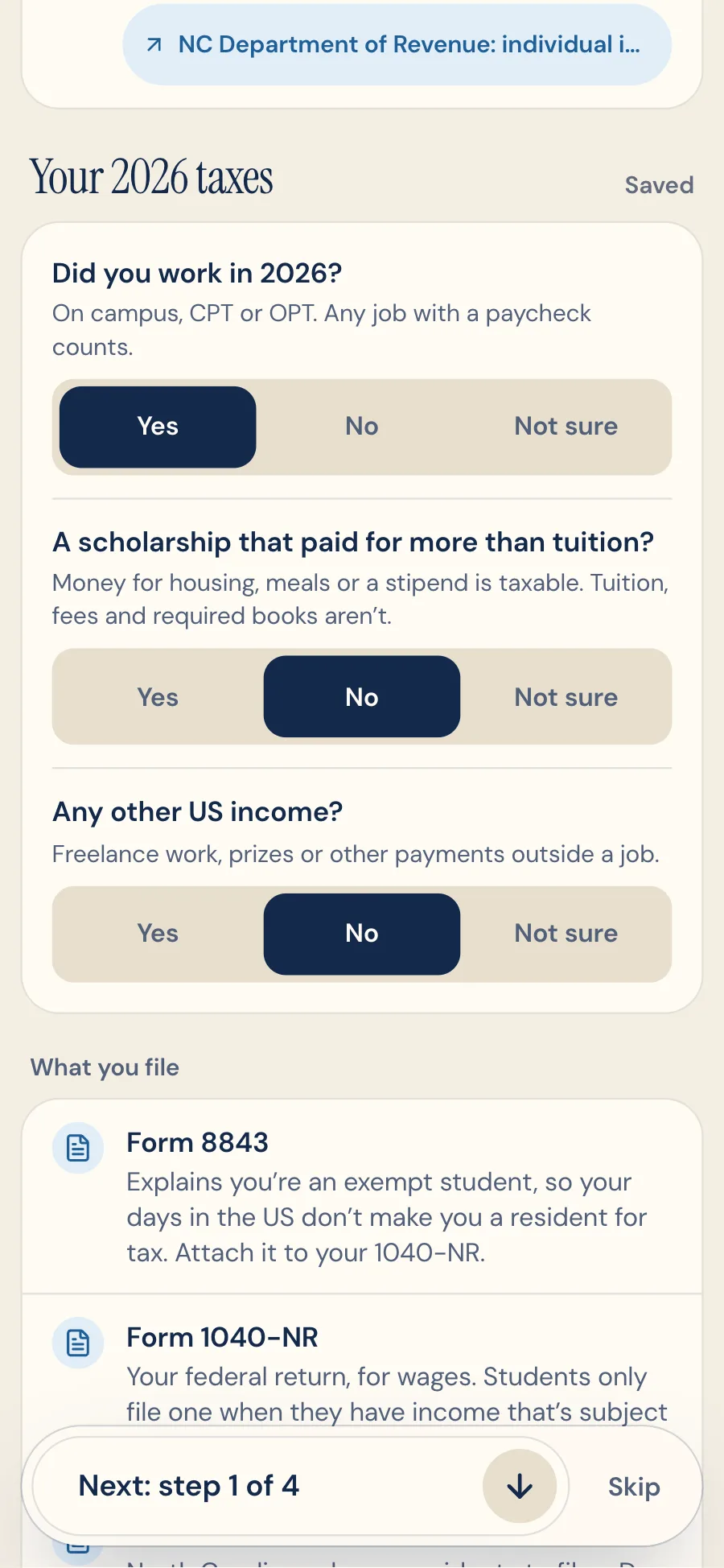
- Three questions (did you work, does a scholarship pay more than tuition, any other income) and Reloco says what to file: Form 8843 always, a 1040-NR with taxable income, a W-7 without an SSN, and the North Carolina return. Due April 15 with wages, June 15 without.
- What to wait for (a W-2 by January 31, a 1042-S by March 15), the days in the US from the student's trips, and which of their 5 exempt calendar years it is.
- W-2s, 1042-Ss and 1099s can be saved in Documents. Their amounts are encrypted, and the SSN or ITIN on them is never read.
- Why it matters
- Every F-1 student files something, and most don't know which form or whether one return covers a campus job, a scholarship and an internship (it does).
- How I built it
- The rules are plain code from IRS publications, tested against students from India (a treaty), Canada, a sixth calendar year and a year abroad. Anything it can't settle, like residency after five years, says to ask ISSS instead of guessing.
5.14
Updates: new rules, and what they mean for you
- What it does
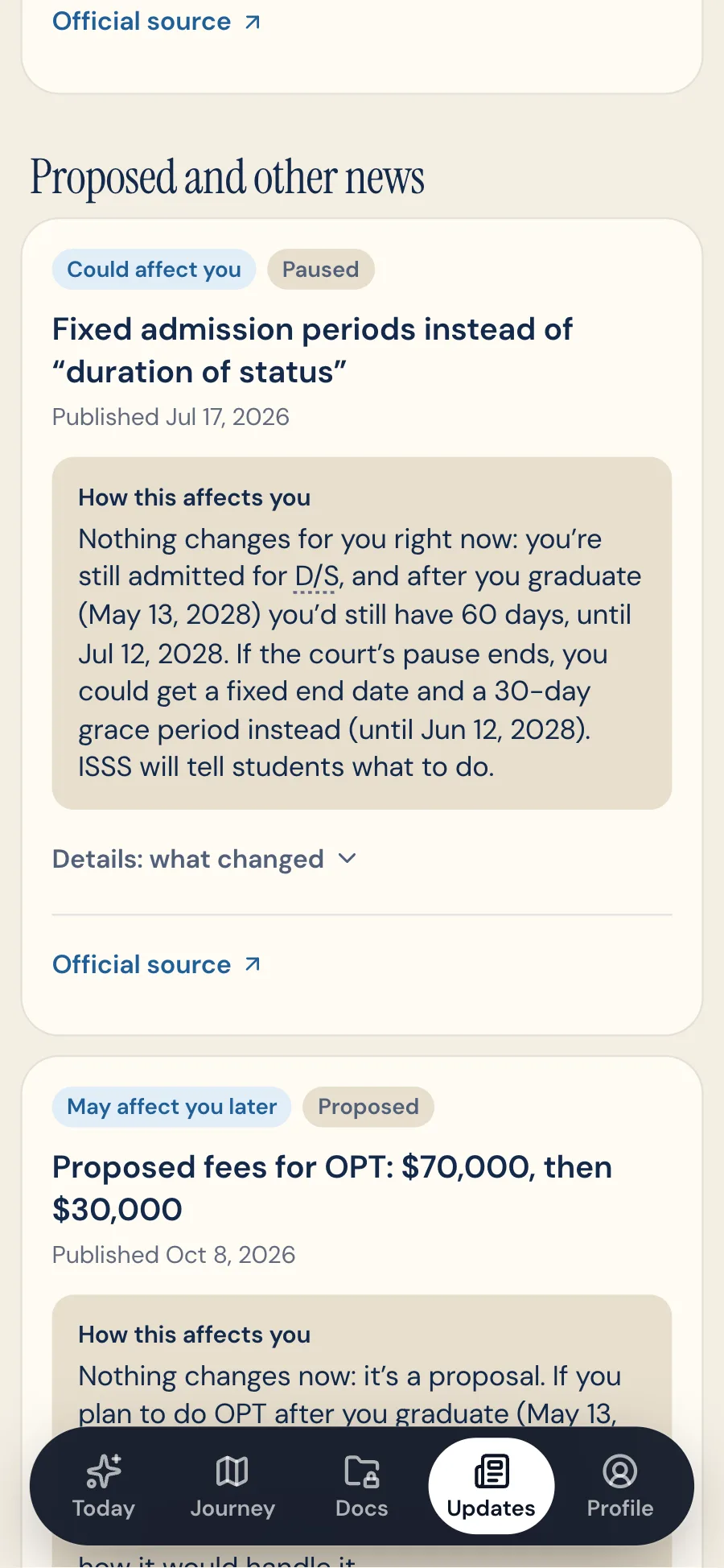
- A tab that follows new rules for international students, like proposed OPT fees, the paused end of duration of status or narrower CPT guidance.
- Each one has its status (proposed, paused, in effect), its key dates, a plain summary, and How this affects you, written with the student's own dates.
- What affects them gets a dot on the tab, and a line in their reminder email if they turned reminders on.
- Why it matters
- Rules changed several times in 2026 alone, and students heard about them secondhand, without knowing whether they applied to them.
- How I built it
- A daily job reads the Federal Register's API. Claude summarizes each new rule once with structured outputs, and it's published only with high confidence, labeled as an AI summary with its source. The note for each student is filled in by rules from their profile, so there's no AI call per student. The eval caught a summary saying a student would pay a fee that the school pays, which led to a who-pays check.
5.15
Sourced, current, and yours to share
- What it does
- Tasks link 90 pages on 37 sites: official pages for every rule, and guides like the CFPB's for banking and credit.
- Sources: UNC offices (ISSS, Campus Health, Housing, One Card, Career Services), federal agencies (the IRS, USCIS, SSA, DHS, CBP, the State Department, USPS), North Carolina (the DMV and the Departments of Revenue and Insurance), local utilities (Duke Energy, OWASA), and consumer guides from the CFPB, FTC and FCC.
- New rules show up in Updates with a note on what they mean for the student (see Updates above).
- The dates in Documents (passport, visa, I-20, I-94) drive the plan, like the reminder to renew a passport.
- Deadlines sync to Google, Apple or Outlook.
- A read-only share page lets family follow along.
- Why it matters
- In compliance, being current and precise is the product. Students told me chatbots were often wrong but their sources were right.
Progress that motivates
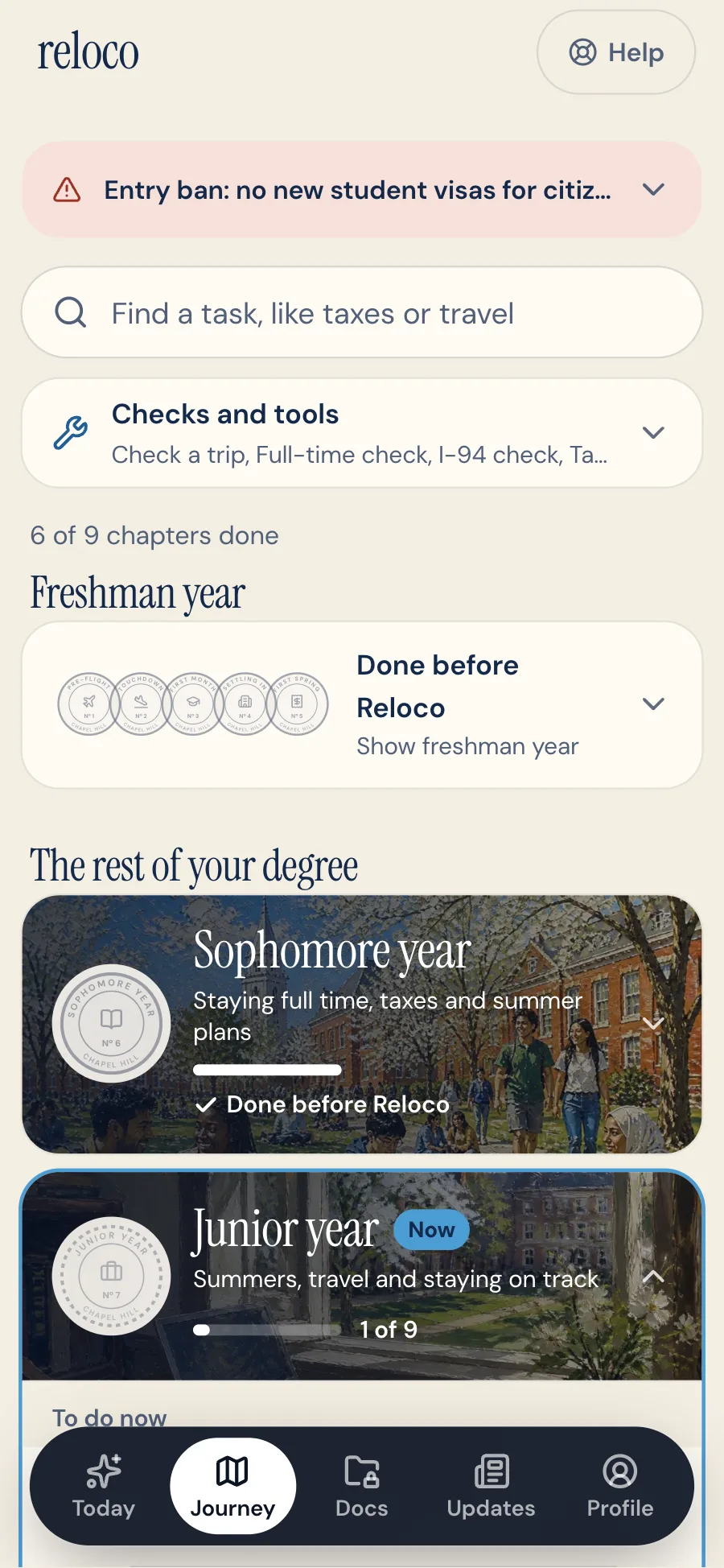
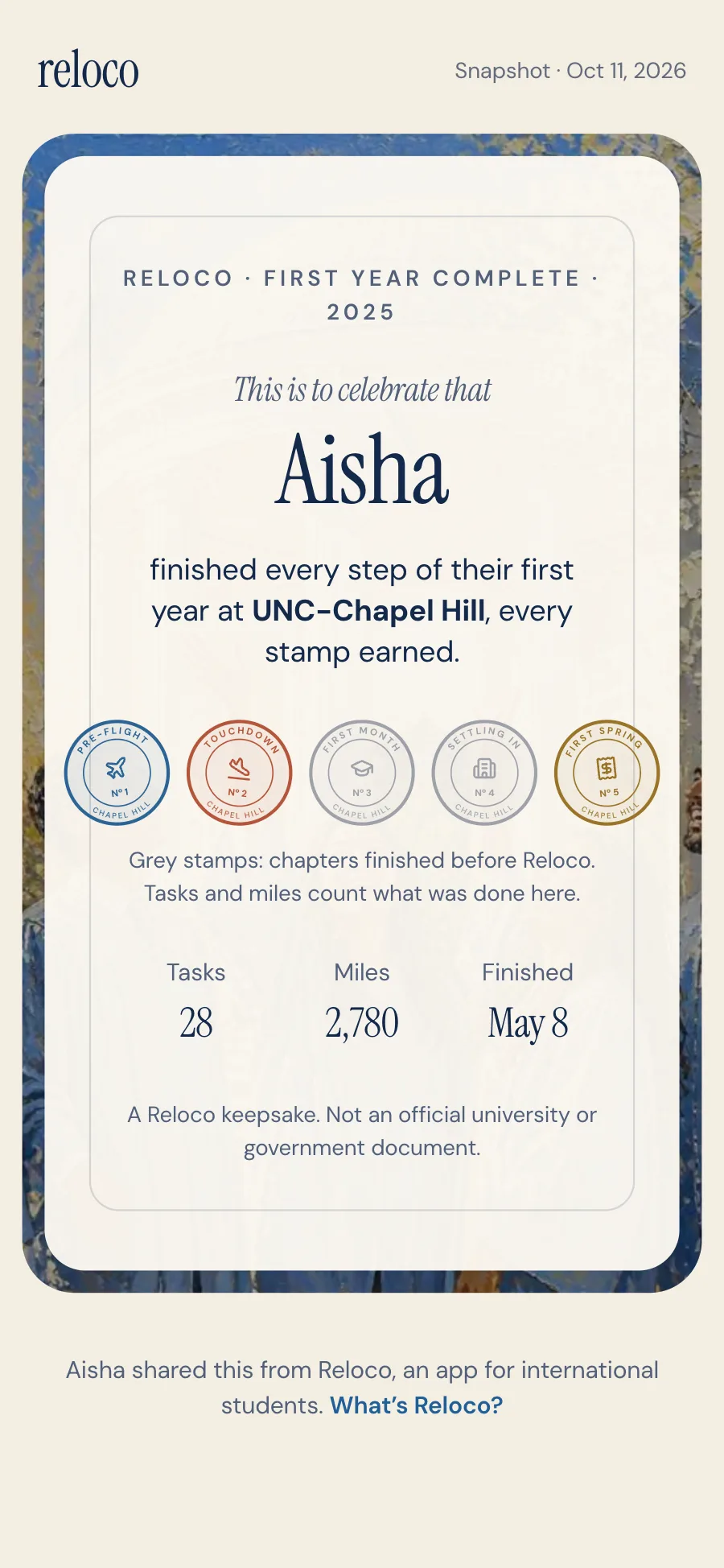
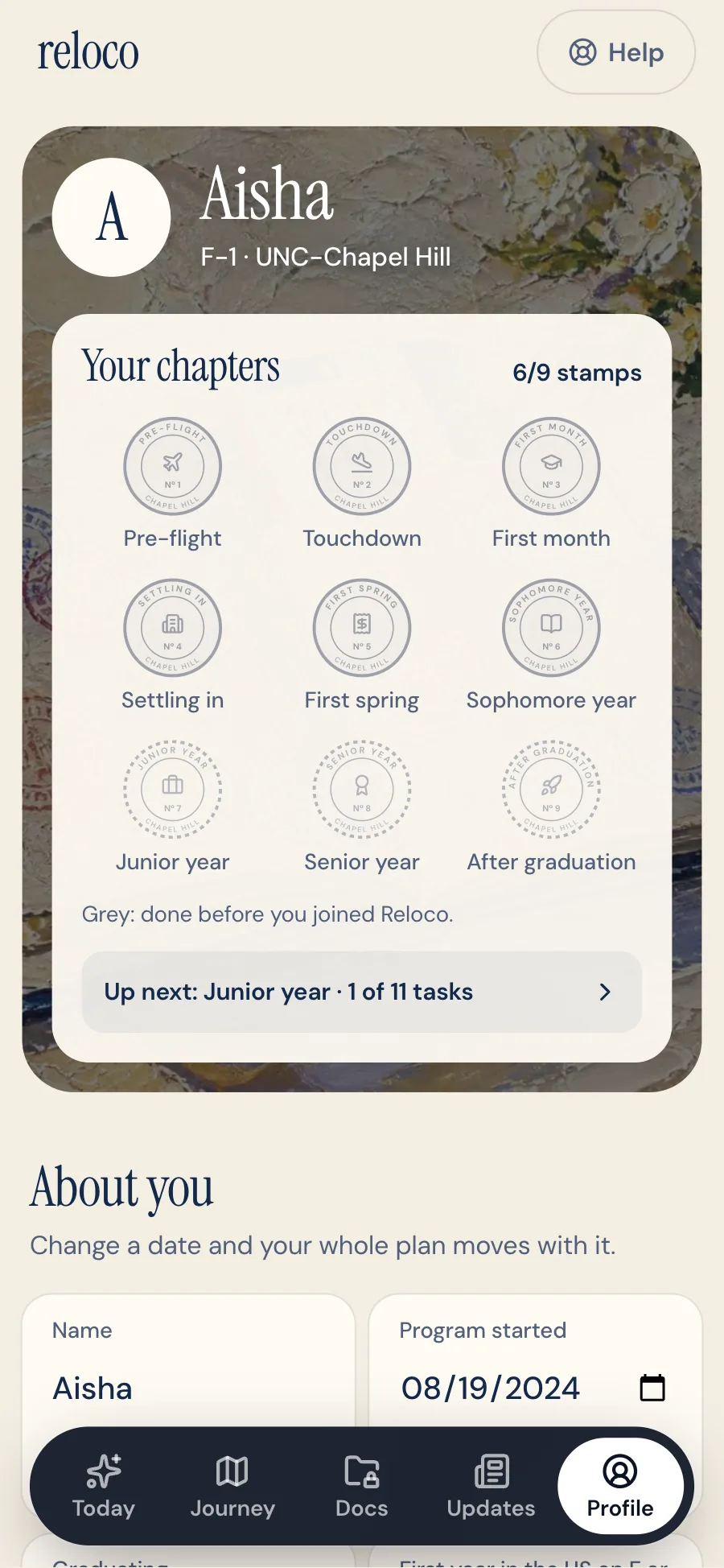
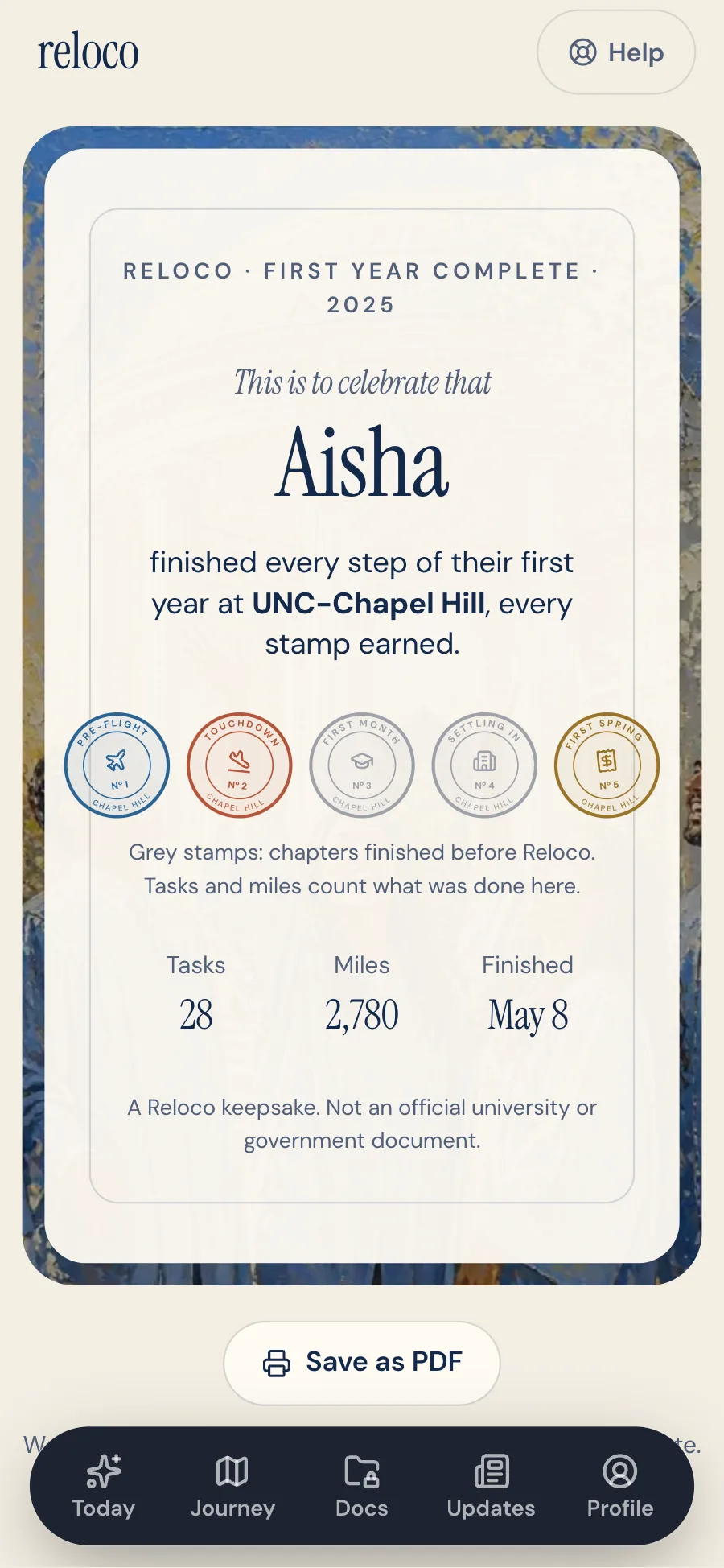
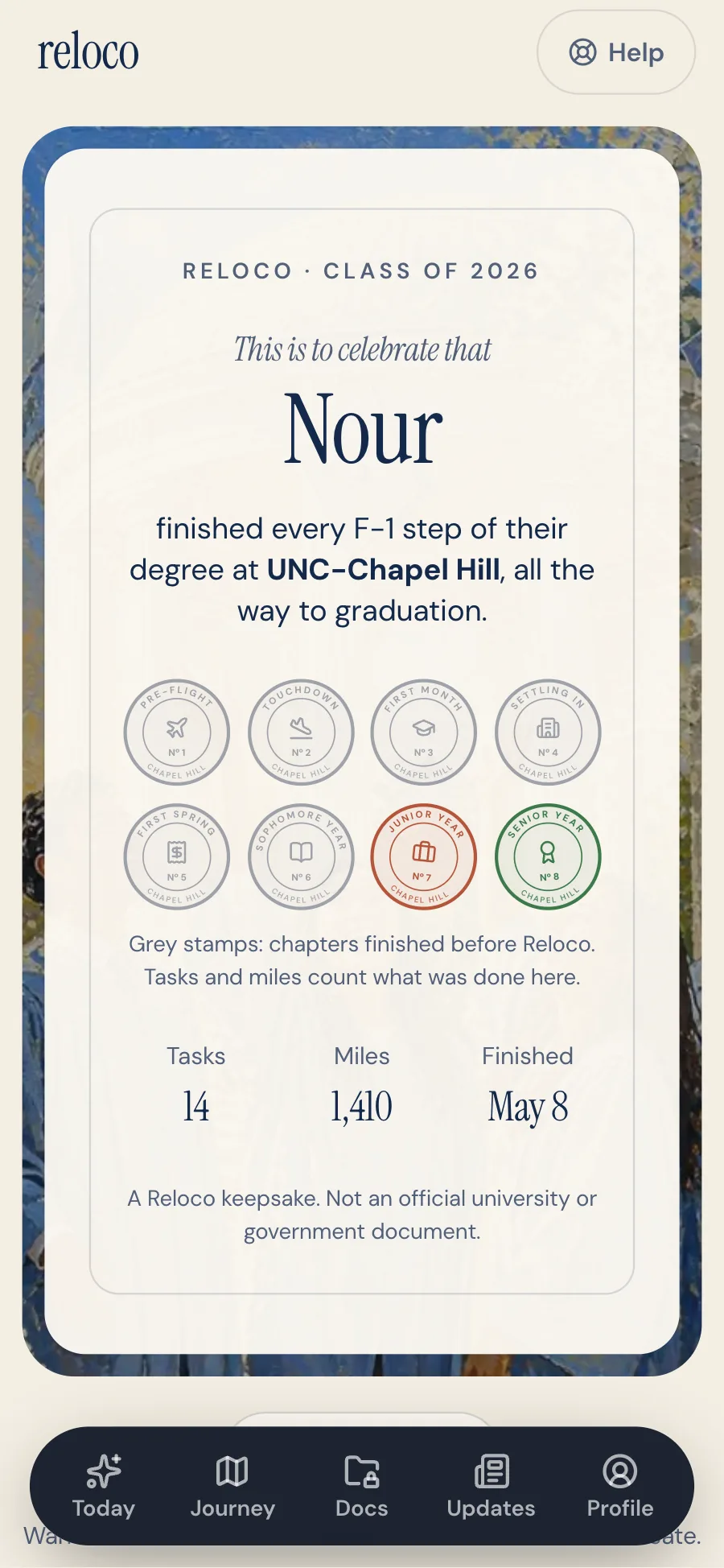
Everyday tasks earn miles, chapters earn stamps, and streaks are weekly, not daily, because visa work comes in bursts. Status and tax tasks earn no points: finishing one shows a calm "done and saved" with Undo instead of confetti. Miles and stamps live in Journey, so Today keeps one number, this year's tasks done. A certificate marks the first year, and another marks graduation.
06
Design
I design in loops: interview, build, walk the app as real students, change what doesn't hold up. The walkthroughs use scripted personas: a freshman months out, a freshman landing in two days, a junior, a student landing today. The AI gets the same loop, with evals in place of walkthroughs.
- 01One next step (Hick's Law)
- Today shows one focus task and at most two more.
- 02The system carries the complexity (Tesler's Law)
- Dependencies and dates live in the engine, not in the student's head.
- 03Calm urgency
- Red only for a real overdue deadline or a rule that changes what's safe to do, like an entry ban; due-soon is blue; missed-before-joining is a question.
- 04Progressive disclosure
- Chapters collapse, each task opens to steps, then sources, and comparisons show the rows that matter first, with details on request.
- 05AI you can check
- Every answer shows what it relied on, code validates each citation, and the assistant suggests changes instead of making them.
- 06Private by design
- Encryption and an access log were in the first version of Documents, not added later. AI reading fills in the details by default and can be switched off on any upload; the choice is remembered.
- 07Calm where it matters
- Status-critical tasks (immigration, taxes, staying full time, reporting an address) earn no points and ask before they're skipped. A rule that changes what's safe to do, like an entry ban, leads with what to do next.
- 08A written design system
- A product brief and a design system file set the rules: one serif weight, flat cards with no shadows, gold only for rewards and brick only for urgency, 44px targets and nothing under 12px. Three rounds of independent design critique, scored on Nielsen's heuristics, found what to fix next.
- 09Mobile-first, works everywhere
- Built at 375px first, then scaled up for laptops, in light and dark, with visible focus and reduced motion.
07
Engineering
L1
Content
What Reloco knows
- Task library: 61 typed tasks. Each declares conditions, date anchors (arrival, program start, tax year, fixed date), dependencies and hard
requires, repeat years or per-event copies, and whether it's optional, travel-only or a later-year task, plus steps, documents and sources. - School pack: UNC's offices, links and airport, kept separate from the engine.
- Country data: tax treaties and passport-validity rules.
- 75 checked facts for the assistant, each with its source and the date I checked it. Calendar facts expire on their own.
- Task library: 61 typed tasks. Each declares conditions, date anchors (arrival, program start, tax year, fixed date), dependencies and hard
L2
Engine
Pure and deterministic. Streams each stage to the setup screen as NDJSON.
ProfileFilterResolve datesExpand yearlyOrder by dependenciesChaptersAI notes (optional, notes only)L3
Runtime rules
Keep a plan honest over time
Not needed: closes optional tasks whose date passed.Catch-up: marks tasks due before the join date.Skip and reopen cascades.Resync by
slug, so progress survives library updates.L4
AI
Grounded, checked, affordable
- Ask Reloco: a streaming tool-use loop on Claude Sonnet 5, with prompt caching on the fixed instructions.
- Citations, reply types and plan suggestions are validated in code before anything reaches the student.
- Document reading and checking with structured outputs, plus format checks for official numbers.
- Readers for leases, insurance policies, offer letters and options a student found: structured outputs with quotes, checked word for word in their evals. A file picked just for one of them is read once and never stored.
- Models chosen by evals and cost: Claude Haiku 5.5 for document reading, checks and notes (about a twentieth of the price), retried once on Sonnet 5 if a read comes back cut off. Ask Reloco and Updates summaries stay on Sonnet 5, where Haiku missed the eval gates.
- Daily caps per student on every AI feature (40 questions, 30 document checks, 10 comparisons), counted in a log students can't edit.
L5
Data
One Store interface
- Supabase Postgres with row-level security on every table and 25 migrations, including checks that every link between rows stays inside one account.
- Facts that tools need (check results, reported moves, OPT jobs) live in one validated JSON field, so most new features ship without a migration.
- Security-definer functions serve the share page and calendar feed by revocable token.
- Google OAuth, with the session refreshed in the request proxy.
- A cookie store runs the app with no database, for local development and visual QA.
L6
Surfaces
What students use
TodayJourneyTask pagesAsk RelocoDocumentsRFC 5545 calendar feedFamily share pageOpt-in email reminders
L7
Security
Built to hold passports
- A Content Security Policy with a fresh nonce on every request, so injected scripts can't run.
- Uploads typed by their real bytes: a page renamed passport.jpg is refused, and files only open in the browser if they're a real image or PDF.
- Sign-in cookies unreadable by page scripts, and sign-in only returns to known addresses.
- A full security review before launch: no cross-account access, no open redirects, and 0 known vulnerabilities in dependencies.
- A second review after launch, by six reviewers working in parallel. It led to encrypting immunization results and pasted messages, a database cap on uploads, and deleting documents added during signup along with the account.
- Error reports through Sentry, sent via Reloco's own address so the page's security policy stays strict. Form contents, cookies, IP addresses, anything sent to Claude and share-link tokens are stripped first, checked on real reports.
Five layers, top to bottom: content (the task library, the school pack and country data); the engine, a pure pipeline from profile to chapters; runtime rules; data (a Store interface over Supabase Postgres with row-level security, plus a cookie store for development); and the surfaces students use.
Quality
674 tests guard the engine's invariants, like never opening a task before its prerequisites. The AI has its own evals: 95 Ask Reloco cases across 5 student personas, where every safety case (referrals, scams, prompt injection) must pass and the gate is 90%. The latest full run passed 92/95 with 0 safety failures, at about 1¢ a question. Document reading scored 196/196 fields and passed 76/76 upload checks, the insurance reader passed 49/49 checks, the comparison reader 31/31, and the award-letter, class-schedule and W-4 readers 69/69, twice. The Updates summarizer is checked against each rule's own text, including who pays a fee. A crawler walks the app as scripted students and captures every screen, the database has grown through 25 migrations, each with row-level security (the newest access rules tested against a real Postgres), and Sentry reports production errors with personal data stripped.
How a plan gets built
- 1Answers are validated with Zod.
- 261 tasks are filtered to the ones that apply (54 for a sample new student).
- 3Anchors become real dates.
- 4Yearly tasks become one copy per year.
- 5Tasks are ordered by dependencies.
- 6Tasks are grouped into 9 chapters.
- 7Claude adds short notes where the student's profile changes how to do a task. It can't change dates or which tasks exist, and if it fails, the plan is complete without it.
- 8The plan is saved, and each step streams to the screen.
Stack
- Frontend
- Next.js 16 (App Router, server actions)
- React 19
- TypeScript
- Tailwind CSS v4
- Motion
- Backend and data
- Supabase (Postgres, row-level security, Storage, Google OAuth)
- Zod
- Node crypto (AES-256-GCM)
- AI
- Claude API: Sonnet 5 (tool use, web search, structured outputs, prompt caching)
- Custom eval suites
- Quality and delivery
- Vitest
- Puppeteer
- Sentry
- Vercel
- GitHub
- Tools
- Figma
- Claude Code
08
What I'm measuring
Now: is it working?
Signals that move within weeks, so I can act on them during the first tester cohort.
- Activation
- Visitors who finish onboarding and get a plan
- WhyTests whether onboarding is short and clear enough
- SourcePlans created vs visits
- First task in week one
- New students who complete at least one task within 7 days
- WhyShows the plan turns into action, not just a list
- SourceCompletion dates
- Week-4 retention
- Students who complete a task in their fourth week
- WhyA degree lasts years, so habit has to form early
- SourceCompletions by week
- Calendar connection
- Students who add their deadlines to a calendar
- WhyReminders outside the app protect deadlines
- SourceAccounts with a calendar feed
- "Not needed" rate by task
- How often each task is marked not needed
- WhyContent quality: a high rate means a task is shown to the wrong students
- SourceTask statuses
- Ask Reloco use
- Students who ask at least one question in their first month
- WhyShows whether answers tied to the plan are worth coming back for
- SourceAI usage log
- Task tools used
- Students who run a check or a comparison on a task that offers one
- WhyShows whether the tools save real work or get skipped
- SourceTool use per task
- Documents saved
- Students who save at least one document
- WhyTrust: people only store a passport somewhere they believe is safe
- SourceDocuments per account
AI: is it right, safe and affordable?
Measured on every change, before students see it.
- Eval pass rate
- Share of the 85 Ask Reloco cases answered correctly
- WhyCatches a worse answer before it ships
- SourceAsk eval suite
- Safety failures
- Cases where it should refer to ISSS, decline, or flag a scam and doesn't
- WhyThe one number that has to stay at zero
- SourceSafety cases in the Ask eval
- Document reading accuracy
- Fields read correctly on specimen documents, and wrong documents refused
- WhyA wrong date on a passport moves a whole plan
- SourceDocument eval suite
- Cost per question
- Model cost per answered question
- WhyAI has to stay affordable at student scale
- SourceToken usage per run
Over time: is it changing outcomes?
The reason Reloco exists. These take a semester or more to show up.
- On-time rateNorth star
- Completed tasks finished by their due date ÷ all completed tasks
- WhyThe core promise: no missed deadlines
- SourceCompletion date vs due date
- Pre-arrival readiness
- Share of a freshman's Pre-flight tasks done before landing day
- WhyThe border is the highest-stakes moment of year one
- SourceTask status vs arrival date
- Return each semester
- Students active again at the start of each new semester
- WhyYearly tasks only help if students come back for them
- SourceActivity by semester
- OPT filed in window
- Graduating students who complete "File your I-765" before its window closes
- WhyThe highest-stakes deadline of the degree
- SourceTask completion vs window end
Baselines come from the first tester cohort. AI numbers come from the eval suites, run before every prompt or model change.
09
Timeline
v0
CompletedInterviews, personas, journey map, first concept.
v1
Completed· September 2026Live at reloco.app: the plan, tasks, arrival mode, progress, sharing and calendar sync.
v2
Completed· September 2026Ask Reloco and Documents, after a security review and eval suites. Live at reloco.app.
v2.1
Completed· October 2026Task tools (the I-94, trip, STEM, CPT and immunization checks, the SSA visit plan, a lease explainer, the OPT unemployment counter and a health insurance helper), side-by-side comparisons, document upload at signup, and reporting a move. Live at reloco.app.
v2.2
Completed· October 2026An OPT application check (the student's own I-765 filing window, eligibility and what to send, with a STEM version) and a DMV visit plan for a first North Carolina driver's license. Live at reloco.app.
v2.3
Completed· October 2026A visa interview check (the passport, I-20, SEVIS fee receipt and DS-160 checked against each other, the interview timing, and what to do after a 221(g) or 214(b)), a second security review, error monitoring that strips personal data, and an in-app feedback form for the first testers. Live at reloco.app.
v2.4
Completed· October 2026Staying on track after signup: invite-only early access, opt-in email reminders, life changes (a new job, an SSN, a trip abroad) and a check-in each term, a tax tool with tax forms saved in Documents, an Updates tab for new rules, and a smarter Ask. Live at reloco.app.
v2.5
Completed· October 2026Six more task tools (whether you need an ITIN, dropping a class, an I-20 extension, the W-4, CPT eligibility and OPT dates), a welcome email, and a UI pass so every screen fits the student's stage. Live at reloco.app.
v2.6
Completed· October 2026A written design system and three rounds of design critique, then the fixes: no points on status-critical tasks, the entry ban surfaced where it changes what's safe, a Get help page with how to reach ISSS, tap-to-explain acronyms, Journey search with every check in one place, CPT history kept as dated periods, and visible focus and 44px targets throughout. Live at reloco.app.
v3
PlannedA pilot with UNC ISSS.
Later
PlannedMore schools on the school-pack layer.
10
Try it
Set it up as a freshman landing next month or a junior planning a summer internship, then ask it something. It takes about two minutes.